
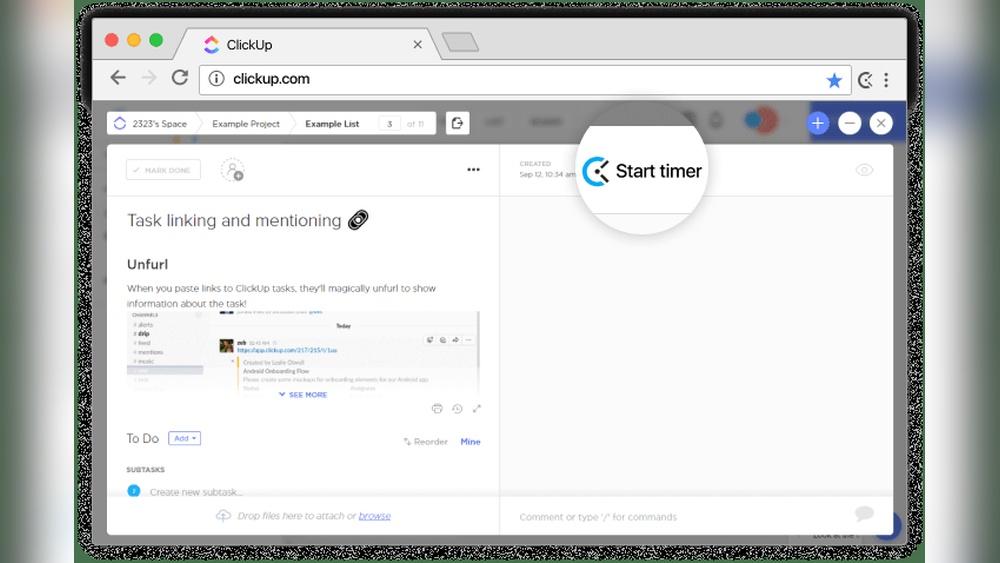
Trying to boost your productivity but stuck choosing between ClickUp and Clockify? You’re not alone.
Both tools promise to help you manage your time and tasks better, but they do it in very different ways. Imagine replacing all your scattered apps with one powerful platform that handles tasks, docs, chats, goals, and even automation—all in one place. That’s exactly what ClickUp offers. On the other hand, Clockify focuses on simple, effective time tracking with easy start/stop timers and manual entries. Which one fits your workflow best? Keep reading to discover how these tools stack up so you can pick the perfect match for your productivity needs. Ready to see how ClickUp can transform your workday? Check it out here: ClickUp.
Introduction To Clickup And Clockify
Choosing the right productivity tool impacts how teams work and track time. ClickUp and Clockify serve different needs but both aim to improve efficiency. Understanding their core functions helps pick the best fit. This section explores what each tool offers and who benefits most.
Overview Of Clickup: An All-in-one Productivity Platform
ClickUp is a versatile platform designed to replace many apps. It combines:
- Task management
- Document creation
- Whiteboards for brainstorming
- Team chat
- Goal tracking
- Dashboards
- Automation features
All these features work in one workspace. This reduces the need to switch between different tools. Teams can manage projects and communication in one place.
Overview Of Clockify: Focused Time Tracking Tool
Clockify is a simple, focused time tracking tool. It offers:
- Timer with one-click start and stop
- Manual time entry
- Ability to continue previous activities
Clockify helps users track work hours easily. It focuses on accurate time records rather than broad project management.
Purpose And Target Audience Of Each Tool
| Feature | ClickUp | Clockify |
|---|---|---|
| Main Purpose | Manage tasks, documents, goals, and team communication | Track time spent on tasks and projects |
| Best For | Teams needing an all-in-one workspace to organize work | Individuals and teams focused on time tracking and billing |
| Users | Project managers, remote teams, and productivity seekers | Freelancers, consultants, and businesses tracking work hours |
ClickUp suits users who want to replace many apps with one platform. Clockify fits those who want a simple, reliable time tracker.
Key Features That Set Clickup Apart
ClickUp stands out by uniting multiple work tools into one platform. It replaces many apps, helping teams focus on one place. The platform supports task management, documentation, communication, and more.
This all-in-one approach simplifies teamwork and boosts productivity. ClickUp’s features go beyond simple time tracking, offering tools to plan, track, and automate work efficiently.
Integrated Workspace: Combining Tasks, Docs, Whiteboards, And Chat
ClickUp merges essential work elements into a single workspace:
- Tasks: Create, assign, and track tasks with ease.
- Docs: Write and share documents without leaving the app.
- Whiteboards: Visualize ideas and brainstorm collaboratively.
- Chat: Communicate instantly within teams.
This integration cuts down on switching apps. Teams stay connected and productive in one spot.
Automation And Dashboards: Streamlining Workflow Management
ClickUp offers automation to reduce manual work. Set rules to move tasks, send alerts, or update statuses automatically.
Dashboards display key project data in real time. Customize them with charts, task lists, and progress bars.
| Automation Features | Dashboard Benefits |
|---|---|
| Auto task assignments | Visual project tracking |
| Status updates | Progress insights |
| Notifications and alerts | Customizable layouts |
These tools help teams save time and stay informed.
Customization And Deep Configuration Options
ClickUp adapts to different workflows with deep customization:
- Custom task statuses and fields
- Multiple views like List, Board, Calendar
- Flexible permission settings
- Custom templates for tasks and projects
Users tailor the platform to fit simple or complex projects. This flexibility supports many industries and team sizes.
Time Tracking Capabilities Within A Broader Toolset
ClickUp includes built-in time tracking, but it goes beyond simple timers.
- Start/stop timers on tasks
- Manual time entries
- Reports linking time to projects
- Integrates tracking with task and project data
Unlike standalone tools, ClickUp’s time tracking fits into a larger system. This helps teams manage time while handling tasks, docs, and communication in one place.
Distinctive Features Of Clockify
Clockify stands out as a reliable and straightforward time tracking tool. It offers essential features that help teams and individuals track work hours efficiently. The focus is on simplicity and accuracy, making it popular among users who want to monitor time without complexity. Below are some key features that make Clockify unique.
One-click Timer: Simple Start, Stop, And Resume Functionality
The one-click timer in Clockify allows users to start, stop, and resume time tracking instantly. This feature reduces the effort needed to log work hours.
- Start timer with a single click
- Pause and resume without losing tracked time
- Easy to switch between tasks quickly
This helps users stay focused on their work without worrying about complex time management steps.
Manual Time Entry And Editing Flexibility
Clockify supports manual time entries for moments when automatic tracking is not possible. Users can add or adjust time logs anytime.
- Enter time for past tasks
- Edit existing time entries for accuracy
- Correct mistakes without hassle
This flexibility ensures that all work hours are recorded correctly, even if the timer was not used.
Focus On Accurate And Lightweight Time Tracking
Clockify is designed to be lightweight and fast. It tracks time with precision but does not slow down devices.
| Feature | Benefit |
|---|---|
| Minimal system resource use | Runs smoothly on all devices |
| Precise time calculation | Ensures billing and reports are accurate |
| Simple background operation | Tracks time without interrupting workflow |
User-friendly Interface For Quick Adoption
The interface is clean and easy to understand. New users can start tracking time with minimal training.
- Clear buttons and controls
- Intuitive layout for fast navigation
- Accessible on web, desktop, and mobile
This design helps teams adopt Clockify quickly and use it daily without confusion.
Pricing And Affordability Comparison
Choosing the right productivity tool often depends on pricing and value. ClickUp and Clockify offer different pricing models. Understanding their costs helps find the best fit for your team size and needs. This section breaks down their pricing tiers, free plans, and overall affordability.
Clickup’s Pricing Tiers And Free Plan Benefits
ClickUp provides a versatile pricing structure designed to fit various users.
- Free Plan: Includes unlimited tasks and members, 100MB storage, and basic integrations.
- Unlimited Plan: Priced per user monthly, with unlimited storage and advanced features like goals and time tracking.
- Business and Enterprise Plans: Offer enhanced automation, custom permissions, and advanced reporting.
The free plan supports essential features, making it useful for individuals and small teams. Paid plans scale well to accommodate growing teams.
Clockify’s Pricing Structure And Free Tier Limitations
Clockify offers a straightforward pricing model focused on time tracking.
| Plan | Price | Main Features |
|---|---|---|
| Free | $0 | Unlimited users and projects, basic time tracking, manual entry |
| Basic | $3.99/user/month | Advanced reporting, billable rates, and time audits |
| Standard | $5.49/user/month | Time rounding, project templates, export options |
| Pro | $7.99/user/month | Invoicing, attendance, and approval workflows |
The free tier is generous but lacks some advanced features found in paid plans. It suits users focused mainly on basic time tracking.
Cost-effectiveness For Small Vs. Large Teams
Small teams or solo users may benefit from ClickUp’s free plan with broad features beyond time tracking.
Clockify’s free plan also supports unlimited users, but lacks task and project management tools.
For large teams, ClickUp’s paid plans offer integrated tools replacing multiple apps, saving costs.
Clockify’s tiered pricing may add up as team size grows and advanced features become necessary.
Value For Money Based On Features And Scalability
ClickUp combines task management, docs, chat, and automation in one platform. This integration adds strong value.
Clockify focuses on precise time tracking with simple usability and detailed reports.
ClickUp’s scalability suits teams wanting an all-in-one workspace. Clockify fits teams needing specialized time tracking.
Choosing depends on whether teams prioritize broad workflow tools or dedicated time tracking.
Pros And Cons Based On Real-world Usage
Understanding the strengths and weaknesses of ClickUp and Clockify helps in choosing the right tool. Both tools serve productivity but focus on different needs. Real users highlight practical benefits and drawbacks from daily use. This section explores these insights clearly.
Advantages Of Using Clickup: Flexibility And Feature Richness
ClickUp offers an all-in-one platform that merges tasks, docs, chat, goals, and automation in one place. Users appreciate its ability to replace multiple apps with a single workspace.
- Highly customizable: Adapt workflows to fit various projects and teams.
- Multiple features: Task management, dashboards, whiteboards, and automation tools included.
- Centralized workspace: Combines communication and project tracking seamlessly.
This flexibility suits complex projects and teams needing more than simple time tracking.
Challenges With Clickup: Complexity And Learning Curve
ClickUp’s rich features create a steep learning curve for new users. Some find navigation and setup overwhelming at first.
- Interface complexity: Many options can confuse beginners.
- Setup time: Customization requires time and effort to optimize.
- Performance issues: Occasionally slows down with heavy data or many users.
Users must invest time to master ClickUp’s full potential.
Advantages Of Clockify: Simplicity And Efficient Time Tracking
Clockify excels in easy and accurate time tracking. Its simple interface appeals to users focused on tracking work hours.
- One-click timers: Start/stop timers quickly for tasks.
- Manual entries: Add or edit time easily.
- Simple reports: Generate clear, basic time reports for projects or clients.
Ideal for freelancers and teams needing straightforward time management without extra features.
Limitations Of Clockify: Feature Constraints And Interface Issues
Clockify offers limited project management beyond time tracking. Some users face interface and feature restrictions.
- Basic task management: Lacks advanced tools like automation or integrated docs.
- Interface simplicity: Can feel too minimal for complex workflows.
- Customization limits: Few options to tailor the workspace or reports.
Clockify may require additional tools for full productivity management.
Credit: help.clickup.com
Ideal Users And Use Case Recommendations
Choosing the right tool depends on your team’s needs and project goals. Both ClickUp and Clockify offer strong features but serve different purposes. Understanding who benefits most from each helps in making the best choice.
Who Should Choose Clickup: Teams Needing An All-in-one Solution
ClickUp suits teams that want a unified workspace for all tasks. It combines:
- Task management
- Document collaboration
- Whiteboards and chat
- Goal tracking and dashboards
- Automation tools
This tool replaces several apps by centralizing work. Teams handling complex projects with many moving parts find ClickUp ideal. It fits teams wanting to manage projects, communication, and progress in one place.
Best Scenarios For Clockify: Focused Time Tracking Needs
Clockify excels at precise and simple time tracking. It offers:
- One-click timer start and stop
- Manual time entry
- Continuation of previous timers
Use Clockify when tracking work hours is the priority. Freelancers and small teams needing easy time logs benefit the most. It is perfect for billing, payroll, and productivity tracking without extra project management features.
When To Opt For Alternatives Based On Specific Requirements
Some teams need features outside ClickUp or Clockify’s scope. Consider these alternatives:
| Alternative | Best Use Case | Key Feature |
|---|---|---|
| Monday.com | Highly visual and customizable workflows | Visual tracking and user-friendly interface |
| Asana | Clean task management | Simple project organization |
| Notion | Flexible documentation and databases | Custom databases and note-taking |
| Trello | Simple Kanban boards | Easy task visualization |
| Wrike | Complex enterprise projects | Advanced project tracking |
| Airtable | Database-driven work | Customizable data organization |
| Jira | Software development teams | Issue and bug tracking |
How Team Size And Project Complexity Influence Tool Choice
Small teams with simple needs prefer Clockify. It tracks time without extra features.
Medium to large teams working on complex projects benefit from ClickUp. It handles multitasking and collaboration well.
| Factor | Clockify | ClickUp |
|---|---|---|
| Team Size | Small to medium | Medium to large |
| Project Complexity | Low to moderate | Moderate to high |
| Feature Needs | Time tracking only | All-in-one project management |
Choose based on your team’s scale and the complexity of tasks. This ensures better productivity and smoother workflows.
Conclusion: Making The Right Choice For Productivity
Choosing the right productivity tool can shape your daily workflow and overall efficiency. Both ClickUp and Clockify offer unique advantages that serve different needs. Understanding their strengths and how they fit your work style helps in making an informed decision. Here is a clear breakdown to guide you.
Summarizing The Unique Strengths Of Clickup And Clockify
| Feature | ClickUp | Clockify |
|---|---|---|
| Core Focus | All-in-One Workspace (tasks, docs, chat, goals, automation) | Simple and Effective Time Tracking |
| Task Management | Advanced task and project management tools | Basic task tracking linked to time entries |
| Time Tracking | Integrated but part of broader functions | One-click timer, manual entry, and resume options |
| Collaboration | Built-in chat, whiteboards, and document sharing | Limited collaboration features, focused on tracking |
| Automation | Supports workflow automation for tasks and projects | No automation features |
Key Considerations Before Committing To A Tool
- Work Complexity: Choose ClickUp if you need all-in-one project and task management.
- Time Tracking Needs: Pick Clockify for easy, focused time tracking without extra features.
- Team Size and Collaboration: Larger teams benefit from ClickUp’s built-in communication tools.
- Budget and Simplicity: Clockify offers a straightforward free plan ideal for small teams or freelancers.
- Integration and Automation: ClickUp is better for those who want automation and multiple app integrations.
Final Thoughts On Enhancing Productivity With The Right Tool
Maximizing productivity depends on matching the tool to your specific needs. ClickUp fits those who want a centralized hub for all work activities. Clockify suits users who want to track time quickly and simply.
Consider your daily tasks, team collaboration, and reporting requirements before deciding. Both tools improve focus and workflow in different ways. Choosing wisely saves time and reduces stress.
Remember, a tool is only as good as how well it fits your work style and goals. Invest time in exploring features and testing each option to find your best fit.
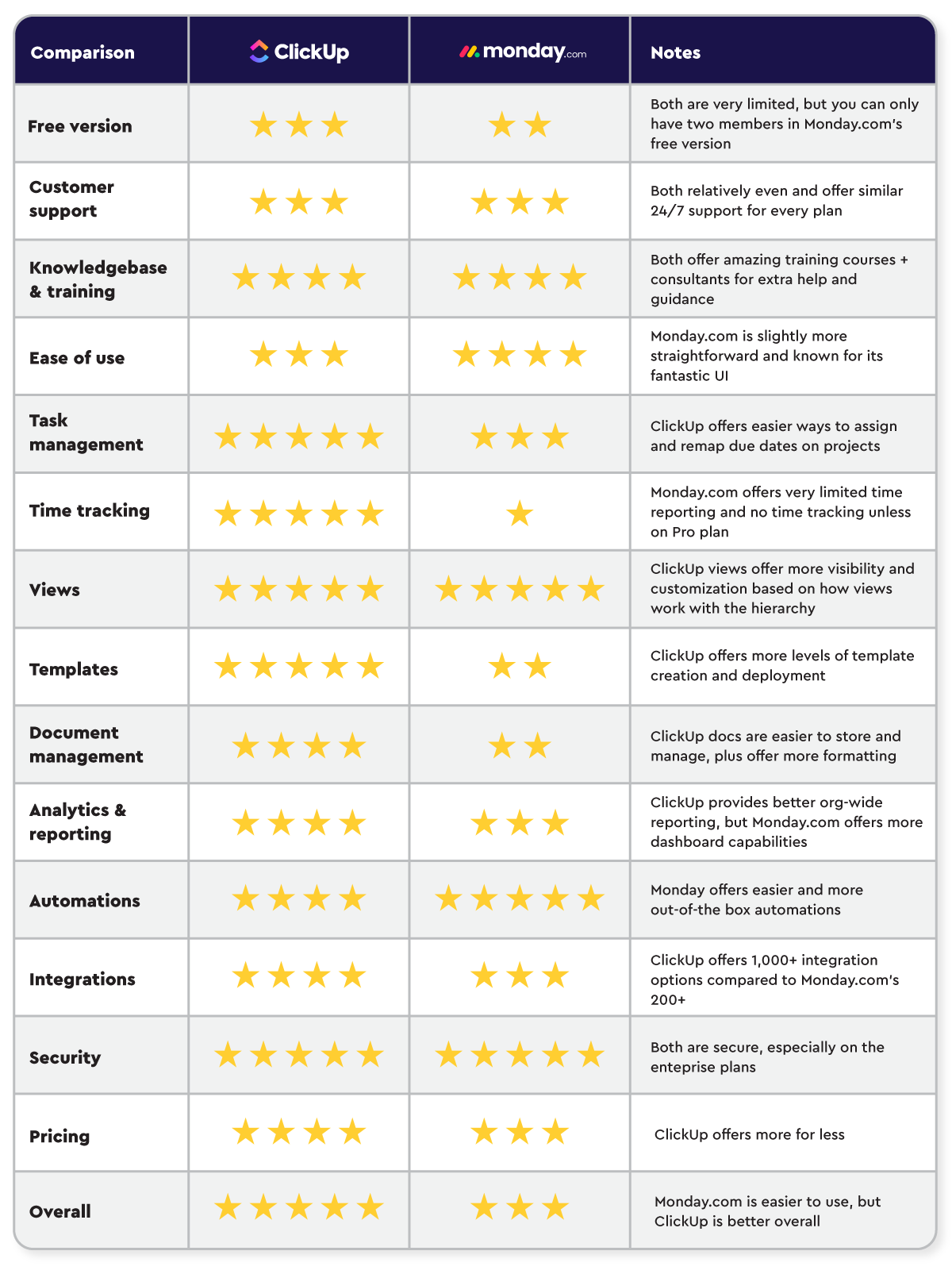
Credit: www.zenpilot.com
Credit: clockify.me
Frequently Asked Questions
What Is The Difference Between Clickup And Clockify?
ClickUp is an all-in-one platform for tasks, docs, and automation. Clockify focuses on simple, accurate time tracking with one-click timers.
Is There Anything Better Than Clickup?
Several tools rival ClickUp depending on needs. Monday. com offers visual workflows, Asana provides simple task management, Notion excels in customization, and Jira suits developers. Each alternative targets specific features like automation, ease, or team size. No single tool universally outperforms ClickUp.
What Are The Disadvantages Of Clockify?
Clockify has limited features for large teams, occasional mobile app issues, a cluttered interface, slow performance, and difficult navigation.
Why Is Clickup So Popular?
ClickUp is popular for its all-in-one platform combining tasks, docs, chat, goals, and automation. It streamlines workflows efficiently.
Conclusion
Choosing between ClickUp and Clockify depends on your work needs. ClickUp offers an all-in-one workspace with tasks, docs, chat, and automation. Clockify focuses on simple, easy time tracking with quick start and stop timers. For teams wanting to replace many apps with one tool, ClickUp fits well. If you need straightforward time tracking, Clockify works fine. Both tools help improve productivity in different ways. Explore ClickUp’s features and see if it matches your style by visiting ClickUp. Find the best fit and boost how you work today.
