
Are you struggling to decide between ClickUp and GitHub for managing your projects and workflows? Choosing the right platform can make a huge difference in how smoothly your tasks get done and how well your team collaborates.
Whether you’re a developer looking for seamless code management or someone who wants to maximize productivity with flexible task organization, understanding the key differences between ClickUp and GitHub is essential. You’ll discover how each tool works, their strengths, and which one fits your unique needs best. Ready to simplify your workflow? Check out ClickUp—the all-in-one platform designed to replace multiple apps and boost your productivity like never before. Keep reading to find out why so many teams are making the switch.
Introduction To Clickup And Github
ClickUp and GitHub serve distinct roles in the digital workspace. Both offer tools that help teams work better. Yet, their focus and users differ significantly. Understanding each platform’s purpose clarifies which suits specific needs.
Overview Of Clickup As A Productivity And Project Management Tool
ClickUp is a comprehensive productivity platform designed to maximize human productivity. It aims to replace multiple apps by combining tasks, documents, goals, and communication in one place. Teams use ClickUp to plan, track, and manage projects with ease.
- Task management with customizable views
- Built-in time tracking and automation
- Collaboration tools for chat and comments
- Integration with many popular apps and AI agents
The platform fits teams of all sizes, from freelancers to enterprises. It helps organize complex workflows and keeps everyone aligned.
Overview Of Github As A Developer-centric Collaboration Platform
GitHub is a platform focused on software development collaboration. It hosts code repositories and supports version control through Git. Developers share, review, and manage code efficiently.
- Source code management with Git
- Pull requests and code reviews
- Issue tracking for bugs and tasks
- Integration with CI/CD pipelines and developer tools
GitHub mainly serves developers, engineers, and open source communities. It streamlines coding projects and encourages team collaboration on software.
Purpose And Audience Of Each Platform
| Platform | Primary Purpose | Main Audience |
|---|---|---|
| ClickUp | Project management, task tracking, and productivity | Teams, managers, freelancers, enterprises |
| GitHub | Source code hosting and developer collaboration | Developers, software engineers, open source projects |
Choosing between ClickUp and GitHub depends on project type and team needs. ClickUp fits broad productivity demands. GitHub is ideal for software development workflows.
Credit: help.clickup.com
Key Features Of Clickup
ClickUp offers a rich set of features designed to boost productivity and simplify project management. It combines multiple tools into one platform, making work easier for teams of all sizes. The features focus on task management, collaboration, automation, and seamless integration with development workflows.
All-in-one Workspace: Integrating Tasks, Docs, And Goals
ClickUp provides a unified workspace where tasks, documents, and goals live together. Users can create and manage tasks alongside rich text docs, wikis, and notes without switching apps. Goals help track progress clearly, aligning daily work with larger objectives.
- Manage tasks with detailed checklists and priorities
- Create and edit documents within the platform
- Set measurable goals and track progress visually
- Centralize all work in one place to reduce app switching
Customizable Workflows And Visual Project Tracking
Workflows in ClickUp adapt to different team needs. Choose from various views to track projects visually and effectively.
| View Type | Description |
|---|---|
| List | Organize tasks in a simple, clear list format |
| Board (Kanban) | Visualize tasks as cards moving across stages |
| Gantt Chart | Plan timelines and dependencies with a timeline view |
| Calendar | See tasks scheduled by date for easy planning |
Custom statuses and fields let teams tailor workflows to their exact needs.
Automation And Time Tracking Capabilities
ClickUp includes powerful automation tools that save time on repetitive tasks. Set rules to update task status, assign users, or send alerts automatically.
- Create custom automation without coding
- Track time spent on tasks directly within ClickUp
- Generate reports to analyze productivity and project timelines
- Integrate time tracking with billing and invoicing processes
Collaboration Tools And Communication Features
Teams communicate and work together inside ClickUp easily. Comments, mentions, and chat keep everyone connected.
- Comment on tasks with rich text, images, and attachments
- Use @mentions to notify teammates instantly
- Share docs and collaborate in real-time
- Built-in notifications keep all members updated
Github Integration: Bridging Development And Project Management
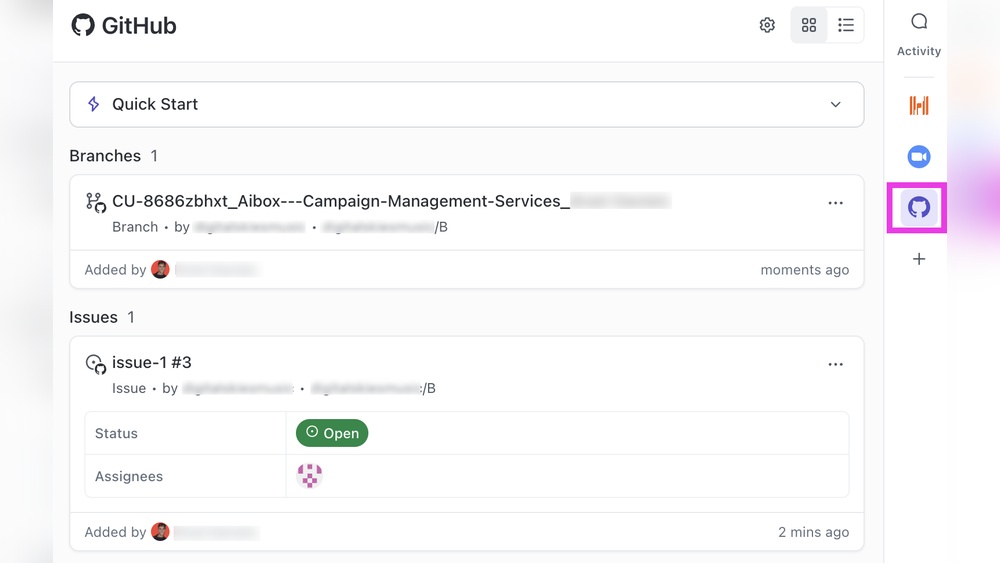
ClickUp connects directly with GitHub to link code and project tasks. Developers and managers stay aligned on progress.
- Sync GitHub commits, branches, and pull requests with tasks
- View code changes and comments inside ClickUp tasks
- Automate task updates based on GitHub activity
- Improve team transparency by bridging development and project tracking
Key Features Of Github
GitHub is a popular platform designed to help developers manage and share their code. It offers many tools that simplify software development and team collaboration. Below are some key features that make GitHub a preferred choice for developers worldwide.
Source Code Management And Version Control With Git
GitHub uses Git, a powerful version control system. It helps developers track changes in their code over time. This means they can:
- Save multiple versions of their projects
- Work on different features without affecting the main code
- Merge changes from multiple team members smoothly
GitHub’s interface makes it easy to manage branches and commits. This improves code quality and reduces errors during development.
Issue Tracking And Agile Workflow Support
GitHub provides issue tracking to help teams organize bugs, tasks, and feature requests. Developers can:
- Create and assign issues to team members
- Label and prioritize tasks
- Use project boards to visualize workflows in an Agile way
These tools support popular Agile methods like Scrum and Kanban, helping teams stay organized and meet deadlines.
Continuous Integration And Deployment (ci/cd) Pipelines
GitHub offers built-in CI/CD pipelines through GitHub Actions. This automates:
- Testing code after each update
- Building the software automatically
- Deploying it to production or staging environments
Automation reduces manual work and catches errors early. Teams deliver updates faster and with more confidence.
Collaboration Features For Developers
GitHub enhances teamwork with several collaboration tools:
- Pull requests: Propose code changes and discuss them before merging
- Code reviews: Review and comment on code to maintain quality
- Project wikis: Create documentation and share knowledge
- Notifications: Stay updated on project activity and discussions
These features improve communication and ensure everyone stays on the same page.
Security And Repository Management Tools
GitHub provides strong security and management options for repositories:
| Feature | Description |
|---|---|
| Access Control | Set permissions for users and teams to protect code |
| Secret Scanning | Detect exposed passwords or keys in code |
| Dependency Alerts | Notify about vulnerable libraries or packages |
| Branch Protection | Require reviews or checks before merging code |
These tools help keep projects safe and maintain high standards.

Credit: productive.io
Pricing And Affordability Comparison
Choosing the right tool depends heavily on pricing and value. Both ClickUp and GitHub offer multiple plans to fit different needs. Understanding their pricing tiers and included features helps teams select the best option for their budget and workflow.
Clickup Pricing Tiers And Included Features
| Plan | Price (per user/month) | Key Features |
|---|---|---|
| Free | $0 |
|
| Unlimited | $5 |
|
| Business | $12 |
|
| Enterprise | Contact sales |
|
ClickUp’s free tier offers a solid start for small teams. Paid plans add powerful features for growing teams and complex workflows.
Github Pricing Plans And Free Tier Details
| Plan | Price (per user/month) | Key Features |
|---|---|---|
| Free | $0 |
|
| Pro | $4 |
|
| Team | $4 per user |
|
| Enterprise | Contact sales |
|
GitHub’s free plan suits individual developers and small projects. Paid plans focus on team collaboration and security.
Cost-effectiveness For Different User Types And Team Sizes
Individuals and freelancers benefit from both platforms’ free tiers. ClickUp’s free plan supports unlimited users with task management. GitHub’s free tier offers unlimited repositories but limits collaborators.
Small teams find ClickUp’s Unlimited plan affordable for enhanced features at $5 per user. GitHub’s Team plan at $4 per user focuses on collaboration and security.
Large teams and enterprises require advanced features and support. Both platforms offer Enterprise plans with tailored pricing and enhanced security.
- ClickUp excels in task and workflow management.
- GitHub specializes in code hosting and developer collaboration.
- Cost depends on the features needed, not just user count.
Choosing the right plan depends on your team’s size and specific needs.
Pros And Cons Based On Real-world Usage
Evaluating ClickUp and GitHub through practical use reveals their distinct strengths and weaknesses. Both tools serve different core purposes but overlap in team collaboration. Understanding their real-world advantages and challenges helps choose the right platform for specific needs.
Strengths Of Clickup For Productivity Professionals
ClickUp excels in centralizing work management. It combines tasks, docs, goals, and chat in one platform. This reduces the need for multiple apps.
- All-in-One Workspace: Integrates project management, documentation, and communication.
- Customizable Views: Offers lists, boards, calendars, and Gantt charts for varied workflows.
- Automation Features: Saves time with task automation and reminders.
- Collaboration: Supports real-time editing and comments for team alignment.
- Cross-Platform Access: Available on web, desktop, and mobile devices.
These strengths make ClickUp ideal for teams aiming to maximize productivity without juggling many apps.
Limitations And Challenges Of Clickup
Despite its many features, ClickUp has some drawbacks:
- Complexity: The rich feature set can overwhelm new users.
- Learning Curve: Takes time to master all tools and workflows.
- Performance Issues: Larger projects may experience slower load times.
- Customization Overload: Too many options can confuse priorities.
- Notification Overload: Users often report excessive alerts.
These challenges may affect teams needing simple, quick setups.
Advantages Of Github For Development Teams
GitHub is a leading platform for software development and version control. It offers:
- Powerful Code Collaboration: Supports pull requests and code reviews.
- Version Control: Tracks changes with Git for reliable history.
- Integration: Connects with CI/CD tools and project boards.
- Community and Open Source: Hosts millions of public repositories.
- Issue Tracking: Helps manage bugs and feature requests effectively.
This makes GitHub essential for development teams focusing on code quality and collaboration.
Drawbacks And Constraints Of Github Outside Development
GitHub’s focus on code limits its usefulness beyond software projects. Key constraints include:
- Non-Developer Teams: Less intuitive for marketing, sales, or HR workflows.
- Project Management Features: Basic compared to dedicated tools like ClickUp.
- Steep Learning Curve: Understanding Git commands is challenging for new users.
- Limited Documentation Tools: Not designed for rich text docs or note-taking.
- Collaboration Focus: Mainly centered on code, not general teamwork.
GitHub suits technical teams but lacks flexibility for broader business use.
Specific Recommendations For Ideal Users And Scenarios
Selecting the right tool depends on your team’s needs and project type. ClickUp and GitHub serve different purposes but can complement each other well. This section guides you on when to use each and how to combine them.
When To Choose Clickup: Best Use Cases And Team Types
ClickUp suits teams that manage diverse workflows beyond coding. It offers a centralized platform for tasks, docs, goals, and communication.
- Project management teams needing clear task tracking and deadlines.
- Marketing and sales teams requiring collaboration on campaigns and pipelines.
- Remote or hybrid teams that benefit from real-time updates and unified communication.
- Organizations aiming to replace multiple apps with one integrated tool.
ClickUp’s customizable views (list, board, calendar) fit various workflows. Its automation and goal-tracking features help keep teams aligned.
When Github Is The Optimal Choice: Developer-focused Scenarios
GitHub excels in software development and version control. It is ideal for teams focused on code collaboration and deployment.
- Developers managing source code with branching, pull requests, and code reviews.
- Open-source projects that require community contributions and issue tracking.
- Teams using CI/CD pipelines for automated testing and deployment.
- Projects needing detailed version history and rollback capabilities.
GitHub supports integration with many development tools, making it a core platform for programming teams.
Combining Clickup And Github For Enhanced Productivity
Use ClickUp and GitHub together to cover project management and code collaboration.
| ClickUp | GitHub | Combined Benefits |
|---|---|---|
| Task assignment and progress tracking | Code version control and reviews | Clear project overview with detailed code history |
| Docs, goals, and communication in one place | Issue tracking and pull requests for developers | Improved team collaboration and fewer missed updates |
| Automation and custom workflows | CI/CD integrations for testing and deployment | Smoother development cycles and faster delivery |
Sync tasks in ClickUp with GitHub commits or issues. This approach keeps non-developers informed and developers focused on code.
Alternative Tools And Competitors
Choosing the right project management and development platform is crucial. Both ClickUp and GitHub offer robust features, but many alternatives fit different needs and workflows. Exploring these options helps teams find tools that match their size, style, and project complexity.
Overview Of Popular Clickup Alternatives And Their Strengths
Several tools offer strong alternatives to ClickUp, each with unique strengths:
| Tool | Strengths | Best For |
|---|---|---|
| Monday.com | Highly visual, customizable workflows, easy tracking | Teams needing visual project management |
| Asana | Simple task management, clean user interface, goal tracking | Small teams wanting structured task lists |
| Notion | Flexible all-in-one workspace, combines docs and databases | Teams needing customizable documentation and tasks |
| Trello | Simple Kanban-style boards, easy to use | Users preferring minimal complexity |
| Wrike | Enterprise features, handles complex multi-team projects | Large organizations requiring advanced management |
| Airtable | Database-driven collaboration, custom views | Data-centric project management |
| Jira | Strong for development teams, issue tracking | Software teams managing releases and bugs |
Comparing Github Alternatives For Development And Project Management
GitHub excels in code hosting and version control. Alternatives offer varied features:
- GitLab: Combines Git hosting with CI/CD pipelines and project tracking.
- Bitbucket: Integrates well with Atlassian tools like Jira and Trello.
- Azure DevOps: Provides end-to-end development lifecycle management.
- SourceForge: Good for open-source project hosting and community collaboration.
These platforms include built-in task boards, issue tracking, and code review tools. Some focus more on development, others on project management.
How To Select The Right Tool Based On Your Workflow Needs
Match tool features to team workflows by considering:
- Project Type: Software development may require Git hosting and CI/CD tools.
- Team Size: Larger teams often need more complex project management functions.
- Ease of Use: Choose tools with interfaces your team can adopt quickly.
- Integration: Check compatibility with existing apps and workflows.
- Customization: Some teams benefit from flexible workflows and views.
- Budget: Compare pricing plans for features and user limits.
Testing free versions or demos helps determine the best fit. Prioritize tools that reduce friction and improve collaboration.

Credit: clickup.com
Conclusion: Making The Right Choice For Productivity Pros
Choosing between ClickUp and GitHub depends on your productivity needs. Both tools serve different purposes but can boost your workflow effectively. ClickUp excels at task management and collaboration, while GitHub focuses on code development and version control. Understanding their strengths helps professionals work smarter.
Summary Of Key Differences And Complementary Strengths
| Feature | ClickUp | GitHub |
|---|---|---|
| Primary Use | Task management, project planning, team collaboration | Code hosting, version control, software development |
| User Interface | Visual and customizable dashboards with multiple views | Code-centric interface focused on repositories and pull requests |
| Team Collaboration | Built-in chat, comments, and docs for all team types | Code reviews, issue tracking, and developer discussions |
| Automation | Task automation, reminders, and templates | CI/CD pipelines and workflow automation via GitHub Actions |
| Best For | Managing workflows across departments | Developers managing code and software projects |
ClickUp and GitHub complement each other well, offering strengths in project management and software development respectively.
Final Thoughts On Integrating Clickup And Github
Integrating ClickUp with GitHub creates a seamless workflow. Developers can track code progress alongside project tasks. Teams stay updated on issues and deadlines in one place.
This integration helps reduce context switching and improves transparency. Task statuses in ClickUp can reflect GitHub events like pull requests or issue closures. Communication becomes clearer.
Use automation to sync updates between platforms. This keeps project managers and developers aligned without manual updates.
Tips For Maximizing Productivity With Either Platform
- For ClickUp: Use templates for recurring tasks to save time.
- Customize views like Kanban, List, or Calendar for easy tracking.
- Set clear priorities and deadlines to keep your team focused.
- For GitHub: Use branches and pull requests for organized code changes.
- Leverage GitHub Actions to automate testing and deployment.
- Keep issues detailed to improve communication and bug tracking.
Both platforms perform best when teams define clear workflows and communicate consistently.
Frequently Asked Questions
Is There Anything Better Than Clickup?
Several tools surpass ClickUp depending on needs. Monday. com excels in visuals, Asana for simple tasks, Notion for flexibility, Jira for developers, and Trello for Kanban simplicity. Choose based on your project type, team size, and required features like automation or integrations.
Can Clickup Integrate With Github?
Yes, ClickUp integrates with GitHub, allowing repository admins to link repos and manage them within ClickUp Spaces.
What Is Better Than Github?
GitLab and Bitbucket offer strong alternatives to GitHub with integrated CI/CD, private repos, and flexible workflows. Choose based on your team’s specific needs.
Is Clickup A Unicorn?
Yes, ClickUp is a unicorn. It reached a valuation over $1 billion after multiple funding rounds.
Conclusion
Choosing between ClickUp and GitHub depends on your needs and goals. ClickUp offers an all-in-one workspace for task management and productivity. GitHub focuses mainly on code hosting and collaboration for developers. Teams wanting a simple project tracker may prefer ClickUp. Developers needing version control will lean toward GitHub. Both tools serve different purposes well. Explore ClickUp’s features at https://careerquestacademy.com/clickup to see if it fits your workflow. Make your choice based on what helps your team work better every day.
