
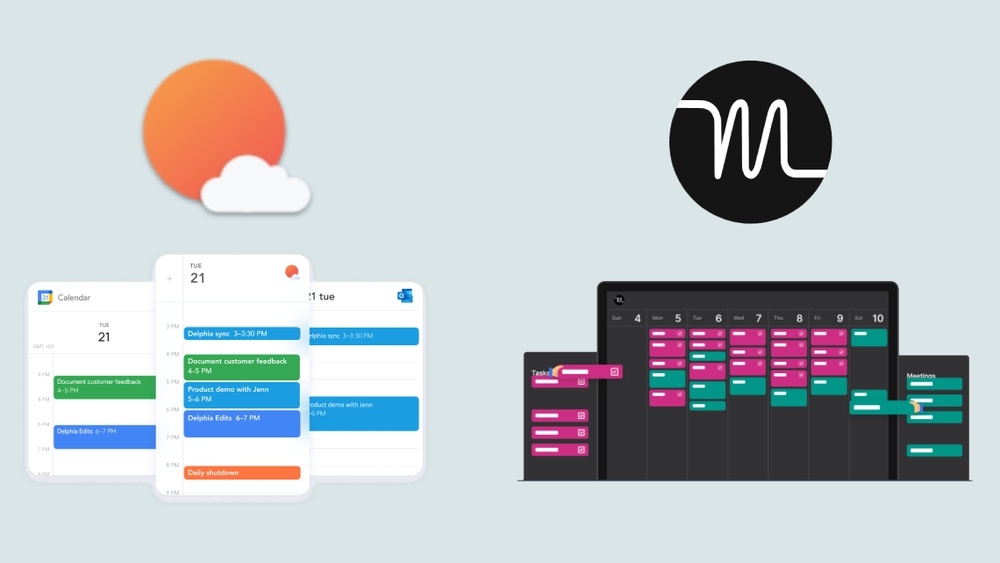
Are you struggling to find the perfect productivity tool that truly fits your work style? When it comes to managing your tasks and calendar, choosing between Motion and Sunsama can feel overwhelming.
Sunsama helps you stay calm and focused by letting you plan your day manually, giving you full control over your schedule. It’s perfect if you want to build better work-life balance and approach your tasks mindfully. On the other hand, Motion uses powerful AI to automatically organize your projects and tasks, saving you time and making it ideal for busy professionals and teams handling a heavy workload. Curious which one suits your needs better? We’ll break down the key differences between Motion and Sunsama so you can pick the right tool to boost your productivity without burnout. Ready to take control of your day? Check out Sunsama and see how it can help you start calm, stay focused, and end confident.
Introduction To Motion And Sunsama
Choosing the right productivity tool can shape your workday. Motion and Sunsama serve different needs but aim to boost efficiency. Understanding their unique features helps find the best fit for your style.
Overview Of Motion: Ai-powered Productivity Automation
Motion uses artificial intelligence to manage your tasks and schedule automatically. It plans your day by fitting tasks into your calendar based on priority and deadlines.
- AI adjusts your schedule dynamically as new tasks appear.
- Reduces time spent on manual planning and rescheduling.
- Integrates with calendars and project management tools.
This automation aims to keep your day balanced without constant effort.
Overview Of Sunsama: Mindful, Manual Daily Planning
Sunsama is a digital daily planner focused on mindful work and calm productivity. It blends task management with calendar planning in one place.
- Allows you to manually select and schedule tasks each day.
- Encourages focus by limiting distractions and setting daily goals.
- Tracks time spent to improve your planning habits.
Sunsama helps users build a steady workflow through deliberate daily planning.
Purpose And Target Audience Of Each Tool
| Tool | Purpose | Target Audience |
|---|---|---|
| Motion | Automate scheduling and task management using AI. | Busy professionals and teams needing hands-off planning. |
| Sunsama | Support mindful, manual daily task planning for focus. | Individuals seeking calm, controlled, and distraction-free days. |
Motion suits users who want automatic calendar management. Sunsama fits those who prefer hands-on control over their daily tasks.
Credit: theprocesshacker.com
Key Features That Define Motion
Motion stands out with smart tools that simplify managing tasks and meetings. Its core features improve daily planning and team workflow. Users get more done with less stress.
Ai Scheduler: Automating Task And Meeting Management
The AI Scheduler in Motion plans your day automatically. It fits tasks and meetings into your calendar without clashes. This saves time and reduces planning effort.
- Automatically schedules tasks based on priority
- Adjusts meetings and deadlines dynamically
- Optimizes your work hours for better focus
This feature helps you avoid overload by balancing workload smartly. It frees your mind from manual scheduling.
Project Management And Team Collaboration Capabilities
Motion supports both individual and team projects with clear task tracking. Teams can share updates, assign work, and track progress easily.
| Feature | Benefit |
|---|---|
| Task Assignment | Assign tasks to team members quickly |
| Status Updates | Keep everyone informed on progress |
| Shared Calendars | Coordinate schedules across the team |
These tools help teams work smoothly and stay aligned on goals.
Dynamic Multitasking And Email Assistant Integration
Motion supports multitasking by letting you switch tasks without losing focus. The Email Assistant connects your inbox with your task list.
- Convert emails into tasks instantly
- Manage several tasks in parallel
- Receive reminders and updates within your workflow
This integration keeps communication and work connected for better efficiency.
Key Features That Define Sunsama
Sunsama stands out as a digital daily planner designed for modern professionals. It helps users stay calm, focused, and confident by combining task management, calendar, and daily planning in one place. The tool emphasizes reducing distractions and encourages mindful work habits.
Below are the key features that define Sunsama and set it apart from other productivity tools.
Manual Time-blocking And Daily Task Drag-and-drop
Sunsama allows users to manually time-block their day, creating a clear schedule for tasks and meetings. This hands-on approach gives full control over how the day is structured.
Tasks can be easily dragged and dropped into different time slots or days. This flexibility helps users adjust their plans quickly, maintaining a realistic and manageable workflow.
- Create dedicated time slots for focused work
- Drag tasks from the to-do list into calendar blocks
- Reschedule with simple drag-and-drop actions
Daily Shutdown Routines And Focus Timers For Mindfulness
Sunsama promotes a healthy work rhythm with daily shutdown routines. At the end of each day, users review completed tasks and plan for tomorrow. This practice builds mindfulness and a sense of accomplishment.
The tool includes built-in focus timers to support concentration during work periods. These timers help break work into manageable chunks, reducing burnout and increasing productivity.
- Review today’s achievements and unfinished tasks
- Set clear goals for the next day
- Use focus timers to maintain deep work sessions
Integration With Popular Tools Like Asana, Notion, And Slack
Sunsama connects seamlessly with other productivity apps. Integrations include:
| Tool | Integration Benefit |
|---|---|
| Asana | Import tasks directly into Sunsama for daily planning |
| Notion | Sync notes and projects to keep work centralized |
| Slack | Receive notifications and updates within Sunsama |
These connections ensure users keep all their work in one place, simplifying task tracking and reducing app switching.
Pricing And Affordability Breakdown
Choosing the right productivity tool depends heavily on pricing and value. Both Motion and Sunsama offer subscription plans with unique features. This section breaks down their pricing tiers and compares their affordability for different users.
Motion’s Pricing Tiers And Value Proposition
Motion provides a tiered pricing structure aimed at individuals and teams.
- Free Plan: Basic task and calendar integration with limited AI features.
- Pro Plan: Around $30/month, includes AI scheduling, project management, and advanced integrations.
- Team Plan: Custom pricing for teams with collaboration tools and admin controls.
Motion’s strength lies in its AI-powered scheduling, which saves time by automating task allocation. The higher plans add significant value for users managing complex schedules or teams.
Sunsama’s Subscription Model And Cost Efficiency
Sunsama uses a simple subscription model focused on individual productivity.
- Monthly Subscription: Priced at $20/month with full access to the daily planner, calendar, and task management features.
- Annual Subscription: Offers a discount, reducing the effective monthly cost.
Sunsama emphasizes a calm, focused workflow. Its pricing is straightforward, making it easy to understand the cost versus benefits.
Comparative Analysis Of Cost Vs Features For Different User Needs
| Feature / User Type | Motion | Sunsama |
|---|---|---|
| Basic Task Management | Free plan available | Paid only, no free tier |
| AI Scheduling | Included in Pro plan | Not available |
| Team Collaboration | Available with Team plan | Limited, mainly solo use |
| Price Range | $0 to $30+/month | $20/month (annual discounts) |
| Best For | Users needing AI automation and team features | Individuals seeking calm and focused daily planning |
For users wanting AI-powered task automation, Motion’s Pro plan offers strong value. Those focused on maintaining calm and structured daily routines may find Sunsama’s simple pricing more cost-effective.
Pros And Cons Based On Real-world Usage
Choosing the right productivity tool depends on how it fits daily needs. Both Motion and Sunsama offer unique features. Users report varied experiences based on their work style and goals. Below, explore the key strengths and weaknesses of each tool.
Advantages Of Using Motion For Busy Professionals And Teams
- AI-driven automation schedules tasks and meetings efficiently.
- Helps users focus by reducing manual planning time.
- Supports team collaboration with shared calendars and task updates.
- Automatically adjusts schedules based on priorities and deadlines.
- Ideal for professionals juggling many tasks and constant changes.
Motion’s AI reduces the stress of managing a complex calendar. It keeps teams aligned by updating everyone in real time.
Limitations And Challenges With Motion’s Ai Automation
- Automation can sometimes misinterpret priorities, causing schedule conflicts.
- Less control over detailed planning for users who prefer manual input.
- May require time to trust AI decisions fully.
- Occasional glitches when syncing with external calendars.
- Not ideal for users who want full control over every time slot.
Some users feel limited by AI’s automatic changes. Others face challenges adapting to less hands-on planning.
Benefits Of Sunsama For Individuals Seeking Work-life Balance
- Manual daily planning encourages thoughtful task selection.
- Integrates tasks with calendars to maintain a clear daily overview.
- Helps users set realistic goals and avoid overloading.
- Focuses on calmness and flow, reducing burnout risks.
- Tracks time spent on tasks to improve future planning.
Sunsama promotes balance by allowing users to plan with intention. It suits those who want a steady, mindful approach.
Drawbacks Of Sunsama’s Manual Planning Approach
- Requires daily effort to plan and adjust tasks.
- Not ideal for users needing quick, automated scheduling.
- May feel time-consuming during busy or unpredictable days.
- Lacks AI to automatically reorder or reschedule tasks.
- Depends heavily on user discipline for effectiveness.
Manual planning can be a hurdle for users with chaotic schedules. Sunsama demands focus and commitment every day.

Credit: efficient.app
Specific Recommendations For Ideal Users And Scenarios
Choosing the right productivity tool depends on your work style and needs. Motion and Sunsama serve different user types and scenarios. This section highlights who benefits most from each tool and how they fit into various productivity philosophies. Clear guidance helps you pick the best match for your daily tasks and long-term goals.
When To Choose Motion: High-volume Workload And Team Optimization
Motion excels for users managing a large number of tasks and complex schedules. It automatically organizes your day by prioritizing and scheduling tasks based on deadlines and availability.
- Best for professionals with high-volume workloads requiring dynamic task shifting.
- Ideal for teams needing shared schedules and coordinated task assignments.
- Helps reduce manual planning by automating calendar management.
Its AI-driven approach suits fast-paced environments where priorities change frequently. Users benefit from real-time updates and optimized time blocks.
When Sunsama Is The Best Fit: Intentional Focus And Habit Building
Sunsama works well for users who want to build daily routines and stay mindful of their work focus. It combines task management with a digital daily planner and calendar.
- Supports users aiming to cultivate habits and maintain intentional focus.
- Helps reduce distractions by encouraging a calm and organized workday.
- Ideal for professionals who prefer manual planning and reflection at day start and end.
Sunsama’s design promotes thoughtful task selection and encourages completing meaningful work without burnout.
How Each Tool Supports Different Productivity Philosophies
| Aspect | Motion | Sunsama |
|---|---|---|
| Productivity Approach | Automation and AI-driven scheduling to optimize time. | Intentional planning and habit formation with manual control. |
| Best For | Dynamic workloads and team coordination. | Focused work sessions and calm, mindful days. |
| Task Management Style | Automated prioritization and rescheduling. | Daily review and deliberate task selection. |
| Focus Support | Handles shifting priorities with minimal input. | Encourages deep focus and avoids multitasking. |
Tips For Integrating Either Tool Into Your Daily Workflow
- Start Your Day by reviewing tasks and priorities within the tool.
- Set Clear Time Blocks for focused work, using either automated or manual scheduling.
- Track Progress by marking tasks done and adjusting plans as needed.
- Use Notifications to stay aware but avoid constant distractions.
- Review Your Day every evening to reflect and prepare for tomorrow.
Motion users should leverage its AI to handle complex calendars and shifting priorities. Sunsama users benefit from its calm interface and habit-building prompts to maintain focus.
Conclusion: Making The Ultimate Choice For Productivity Masters
Choosing between Motion and Sunsama depends on your workflow needs. Both tools offer unique features that can boost productivity. This section helps clarify the differences and guide your decision.
Summary Of Key Differences And Unique Benefits
| Feature | Motion | Sunsama |
|---|---|---|
| Core Function | AI-powered scheduling and task automation | Daily planner combining task management and calendar |
| Focus | Automates calendar optimization and task allocation | Helps users plan daily tasks with focus and calm |
| User Experience | Hands-off scheduling, ideal for busy professionals | Encourages mindful work habits and distraction reduction |
| Best For | People needing automated time blocking and seamless rescheduling | Those who want control over their daily plan and task focus |
| Unique Benefit | Smart AI adjusts your calendar dynamically | Combines task list, calendar, and focus techniques in one |
Aligning Tool Selection With Personal And Professional Goals
Identify your primary goal for a productivity tool:
- Automation preference: Motion’s AI reduces manual scheduling.
- Structured planning: Sunsama promotes daily mindfulness and task prioritization.
- Work style: Choose Motion for a dynamic calendar or Sunsama for a calm daily planner.
- Task complexity: Sunsama works well for managing detailed daily task lists.
- Flexibility needs: Motion adapts automatically to changes in your day.
Consider your work habits and stress levels. Sunsama suits those wanting focus and calm. Motion fits users preferring automatic time management.
Final Thoughts On Motion Vs Sunsama For Enhanced Productivity
Both tools improve productivity in distinct ways. Motion is perfect if automation and time-blocking matter most. Sunsama excels at helping users plan their day calmly and stay focused.
Test both tools to see which fits your rhythm. Remember, the best productivity tool supports your goals and reduces stress. Choose the one that helps you work smarter, not harder.

Credit: www.youtube.com
Frequently Asked Questions
What Is Better Than Motion Ai?
Sunsama offers mindful, manual planning with time-blocking, ideal for work-life balance. Motion uses AI for automated scheduling, perfect for high-volume tasks and teams. Choose Sunsama for intentional focus; choose Motion for powerful AI-driven task management. Both excel in different productivity needs.
Is Sunsama Worth It For Adhd?
Sunsama offers structured daily planning with manual time-blocking, aiding ADHD users in focus and prioritization. It promotes mindfulness and work-life balance.
Is Sunsama A Good Productivity Tool?
Sunsama is a good productivity tool for mindful, manual daily planning and improving work-life balance. It integrates well with popular apps.
Is Motion Worth It For Personal Use?
Motion is worth it for personal use if you want AI-driven task scheduling and efficient project management. It saves time and boosts productivity.
Conclusion
Choosing between Motion and Sunsama depends on your work style. Sunsama helps you plan your day calmly and stay focused. It supports manual time-blocking and encourages mindful work habits. Motion uses AI to schedule tasks automatically, saving time for busy teams. If you want more control and reflection, Sunsama fits well. For hands-off, AI-driven task management, Motion works best. Both tools improve productivity but in different ways. Pick the one that matches your daily needs and work pace.
