
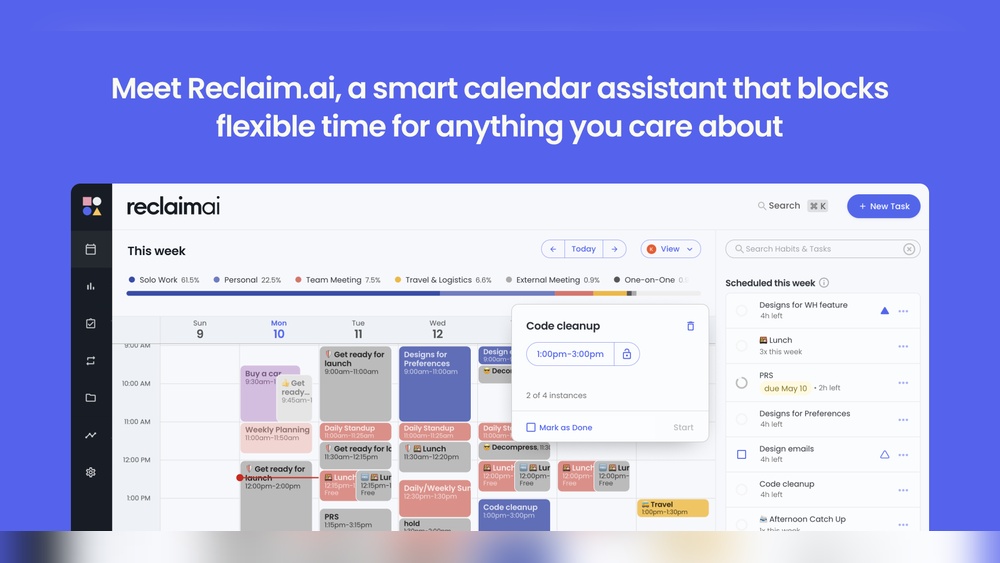
Are you tired of juggling your work, meetings, and personal time every single day? Imagine having a smart assistant that organizes your calendar for you, so you can focus on what really matters.
That’s exactly what Reclaim Ai offers. This AI-powered calendar app automatically schedules your tasks and meetings, helping you reclaim your time and boost productivity. Ready to see how Reclaim Ai can transform your daily routine? Discover all its powerful features and start taking control of your schedule today. Check out Reclaim Ai now and unlock a smarter way to plan your life.

Credit: efficient.app
Introduction To Reclaim Ai And Its Purpose
Reclaim AI is an intelligent calendar assistant designed to manage your time efficiently. It blends work, meetings, and personal tasks into one smart schedule. The app uses artificial intelligence to plan your day automatically, saving you hours of manual scheduling. Its main goal is to help users focus on what matters most by handling time management with ease.
What Is Reclaim Ai?
Reclaim AI is an AI-powered calendar app that organizes your tasks and meetings. It connects with your existing calendars and learns your priorities. The app then finds the best time slots for work and breaks, adjusting as plans change.
- Automatically schedules meetings and tasks
- Reschedules when conflicts arise
- Balances work and personal time
- Integrates with popular calendar platforms
This makes Reclaim AI a helpful tool for busy professionals and teams.
How Reclaim Ai Transforms Scheduling
Reclaim AI changes the way scheduling works by using smart algorithms. It takes your inputs and finds the best way to fit everything into your calendar.
- Dynamic Time Management: Automatically moves tasks to free up your calendar.
- Priority-Based Planning: Focuses on your most important work first.
- Meeting Optimization: Schedules meetings only in available slots without overlap.
- Break and Buffer Scheduling: Adds breaks to prevent burnout.
This approach reduces stress and improves time use.
The Importance Of Smart Scheduling In Productivity
Smart scheduling boosts productivity by organizing time clearly and logically. It prevents double-booking and last-minute rushes.
- Increases focus: Blocks time for deep work without interruptions.
- Enhances work-life balance: Ensures personal time is respected.
- Reduces decision fatigue: Saves energy by automating time choices.
- Improves deadline management: Keeps tasks on track with reminders.
With smart scheduling, users gain control over their day and reduce stress.
Key Features Of Reclaim Ai That Boost Productivity
Reclaim AI offers smart tools designed to save time and help users focus. It automates calendar management and task scheduling, making daily planning easier and clearer. These features work together to increase productivity by reducing manual effort and keeping priorities in check.
Automated Calendar Optimization: Maximizing Time Efficiency
Reclaim AI automatically finds the best times for tasks and meetings. It fills calendar gaps with important work, preventing wasted time. The app adjusts your schedule to fit deadlines and personal routines.
- Detects free slots for task scheduling
- Balances work, meetings, and breaks
- Reschedules tasks to avoid conflicts
This automation helps users get more done without constant manual planning.
Smart Task Prioritization: Focus On What Matters Most
The app ranks tasks based on urgency and importance. It highlights critical work first, so users spend time on high-value activities. Tasks with flexible deadlines move lower on the list.
- Prioritizes tasks by deadlines and impact
- Adjusts priorities as schedules change
- Helps avoid procrastination on key tasks
Users stay focused on what drives results, improving overall efficiency.
Adaptive Time Blocking: Flexibility Meets Structure
Reclaim AI creates blocks of time for focused work and meetings. It adapts these blocks when plans shift, keeping the day organized. This balance supports both structure and flexibility.
- Automatically blocks time for tasks and breaks
- Changes blocks in response to new events
- Encourages deep work sessions without interruptions
Adaptive time blocking helps maintain productivity even on busy days.
Seamless Integration With Popular Calendar Apps
Reclaim AI connects easily with Google Calendar, Outlook, and other tools. It syncs all events and tasks in real time. This ensures users see a complete, updated schedule in one place.
| Calendar Apps | Integration Features |
|---|---|
| Google Calendar | Real-time sync, event updates, task management |
| Outlook | Two-way sync, meeting scheduling, notifications |
| Apple Calendar | Event imports, time blocking, reminders |
This seamless sync reduces scheduling errors and saves time.
Collaborative Scheduling: Simplifying Team Coordination
Teams using Reclaim AI can schedule meetings with less back-and-forth. The app finds common free slots across calendars. It also adjusts schedules to fit everyone’s priorities.
- Shares availability with team members
- Suggests meeting times automatically
- Keeps individual tasks and team events balanced
Collaborative scheduling cuts down on email chains and meeting conflicts.
Pricing And Affordability Breakdown
Reclaim AI offers several pricing options to fit different needs and budgets. Understanding these plans helps you choose the right one for your work and lifestyle. The pricing is clear and the features match the cost well. This section breaks down Reclaim AI’s pricing tiers, what each plan offers, and trial options.
Overview Of Pricing Tiers And Plans
| Plan | Price (per month) | Best For |
|---|---|---|
| Free Plan | $0 | Basic scheduling and task automation |
| Pro Plan | $7 | Individuals needing advanced AI scheduling |
| Team Plan | $15 | Small teams for collaboration and shared calendars |
| Enterprise Plan | Custom pricing | Large organizations with custom needs |
Value For Money: Features Included In Each Plan
Each Reclaim AI plan includes useful features that increase with the price. The free plan covers basic calendar syncing and smart scheduling. The Pro plan adds:
- Automatic task blocking
- Priority support
- Integrations with popular tools
The Team plan includes all Pro features plus:
- Team calendar sharing
- Collaborative scheduling
- Admin controls
Enterprise plans offer:
- Custom integrations
- Dedicated support
- Advanced security
Free Trial And Money-back Guarantee Options
Reclaim AI provides a free trial for new users to explore Pro features without cost. This trial lasts for 7 days. It lets users test the app’s full capabilities before paying.
The company also offers a money-back guarantee within the first 14 days. This policy gives peace of mind and reduces risk when choosing a paid plan.

Credit: www.saner.ai
Pros And Cons Based On Real-world Usage
Reclaim AI offers a smart way to manage your time by scheduling work, meetings, and personal tasks automatically. Real users find it helpful but also note some limits. This section breaks down the key advantages and drawbacks of Reclaim AI based on actual use. It also shares common user experiences.
Advantages Of Using Reclaim Ai For Scheduling
- Automatic Task Prioritization: Reclaim AI adjusts your calendar to fit high-priority tasks first.
- Smart Time Blocking: It creates focused work blocks and schedules breaks to boost productivity.
- Integration with Calendars: Works smoothly with Google Calendar and other calendar apps.
- Flexible Rescheduling: Automatically moves tasks around when meetings or events change.
- Focus on Work-Life Balance: Helps block personal time alongside work tasks to prevent burnout.
- Easy Setup: The app is simple to start using, even for beginners.
Limitations And Areas For Improvement
- Learning Curve: Some users find the AI rules complex at first.
- Limited Customization: Custom rules can be hard to create for unique schedules.
- Mobile Experience: The mobile app lacks some features found on desktop.
- Dependency on Calendar Accuracy: Errors happen if calendar events are not updated.
- Notifications: Some users want more control over notification timing and frequency.
User Feedback And Common Experiences
| Positive Feedback | Negative Feedback |
|---|---|
|
|
Users recommend patience while learning the app features. Most find benefits grow with regular use.
Ideal Users And Scenarios For Reclaim Ai
Reclaim AI is designed for professionals who want smarter, automatic scheduling. It suits users needing help balancing work tasks, meetings, and personal time. The tool adapts to different work styles and team sizes. It helps save time and reduce calendar conflicts.
Who Benefits Most From Smart Scheduling?
Individuals who juggle many tasks daily gain from Reclaim AI’s smart scheduling. It automatically finds the best time for focus work and breaks.
Managers and team leaders use it to coordinate meetings without manual back-and-forth. It adjusts to everyone’s availability.
Busy professionals with changing priorities benefit from its dynamic calendar updates. The AI reschedules tasks when meetings shift.
Use Cases: From Freelancers To Large Teams
| User Type | How Reclaim AI Helps |
|---|---|
| Freelancers | Organizes client calls, project work, and personal time automatically. |
| Small Teams | Syncs calendars to find ideal meeting times without conflicts. |
| Large Teams | Manages multiple time zones and complex schedules efficiently. |
Maximizing Productivity In Remote And Hybrid Work Environments
- Remote workers can block focus time easily despite scattered schedules.
- Hybrid teams benefit from automatic syncing across office and home calendars.
- Flexibility in scheduling helps adjust work hours and meetings smoothly.
- Reduces burnout by balancing work and personal life through smart breaks.

Credit: reclaim.ai
Frequently Asked Questions
What Are The Main Features Of Reclaim Ai?
Reclaim AI offers smart scheduling, automatic calendar optimization, and task prioritization. It integrates with popular calendar apps to save time and boost productivity.
How Does Reclaim Ai Improve Time Management?
Reclaim AI automatically finds the best time for tasks. It adjusts your calendar dynamically, ensuring no overlap and maximizing free time.
Can Reclaim Ai Sync With Multiple Calendars?
Yes, Reclaim AI supports syncing with Google Calendar, Outlook, and other major calendar platforms. This ensures seamless scheduling across devices.
Is Reclaim Ai Suitable For Team Collaboration?
Absolutely. Reclaim AI allows shared calendars and task assignments, helping teams coordinate schedules and improve overall efficiency easily.
Conclusion
Reclaim AI helps you manage your time smartly and easily. It schedules work, meetings, and life tasks without hassle. This AI calendar app saves effort and keeps your day organized. Try Reclaim AI to make your planning simple and clear. Discover how it fits your routine at Reclaim AI. Start using smart scheduling today for a balanced work-life flow.
