
Choosing the right tool to organize your work can make all the difference in how productive and calm you feel each day. You might already know Trello as a popular task manager with its simple boards and cards.
But what if you want more than just basic task tracking? That’s where Sunsama comes in—a unique daily planner designed to help you start calm, stay focused, and end your day confident. Imagine having your tasks, calendar, and daily plan all in one place, helping you eliminate distractions and get meaningful work done without burning out. Curious how Sunsama stacks up against Trello and which one fits your style better? Let’s dive into the Sunsama Vs Trello showdown and find the perfect match for your workflow. Ready to explore Sunsama right now? Check it out here: Sunsama.

Credit: efficient.app
Introduction To Sunsama And Trello
Choosing the right productivity tool helps manage tasks and time effectively. Sunsama and Trello stand out as popular options, each with unique features. Understanding their purpose and core functions guides the best choice for your work style.
Overview Of Sunsama: Purpose And Core Functionality
Sunsama is a digital daily planner designed for modern professionals. It combines task management, calendar integration, and a focused daily planning approach. The platform aims to help users:
- Stay calm and reduce distractions
- Organize tasks into a realistic daily schedule
- Maintain focus on high-impact work
- Avoid burnout through balanced planning
Its interface encourages users to plan each day intentionally, syncing tasks with calendars and providing a clear overview of priorities.
Overview Of Trello: Purpose And Core Functionality
Trello is a flexible project management tool based on boards, lists, and cards. It helps users visualize workflows and organize tasks visually. Key features include:
- Drag-and-drop task cards for easy management
- Customizable boards for projects or teams
- Collaboration with comments, attachments, and due dates
- Integration with many third-party apps
Trello suits individuals and teams who prefer a visual and simple way to track work progress.
Why Compare Sunsama And Trello? Understanding Their Roles In Productivity
Both Sunsama and Trello improve productivity but serve different needs. Sunsama focuses on daily planning and time management by combining tasks with calendar events. Trello excels in project organization and team collaboration through its visual boards.
| Feature | Sunsama | Trello |
|---|---|---|
| Primary Use | Daily task planning and focus | Project and task visualization |
| Interface Style | Calendar-driven planner | Board, list, and card system |
| Best For | Individuals aiming for focused days | Teams managing projects visually |
| Collaboration | Limited, personal focus | Strong team collaboration tools |
Understanding these differences helps pick the right tool. Sunsama fits users wanting calm and focus daily. Trello suits those needing flexible project views and teamwork.
Key Features That Define Sunsama
Sunsama blends task management, calendar planning, and daily focus into one tool. It helps professionals manage their day calmly and stay focused on important work. The platform’s features support smooth workflows without overwhelm or burnout.
Daily Planning And Time Blocking: Enhancing Focus And Workflow
Sunsama centers on daily planning combined with time blocking. Users set clear priorities by scheduling tasks in dedicated time slots. This approach helps block distractions and boosts productivity.
- Create a focused plan for each workday
- Drag tasks into specific time periods
- Keep daily goals realistic and manageable
- Review and adjust plans to stay on track
This method encourages working with intention and maintaining steady progress.
Two-way Integration With Trello: Streamlining Task Management
Sunsama offers two-way integration with Trello, syncing tasks smoothly between platforms. Cards from Trello can be pulled into Sunsama’s daily planner and scheduled with ease.
| Sunsama Features | Benefits of Trello Integration |
|---|---|
| Drag Trello cards to daily calendar | Visualize Trello tasks within time blocks |
| Automatic two-way sync | Updates reflect on both Sunsama and Trello |
| Focus on finishing tasks | Less time juggling tools, more on work |
This integration reduces tool switching and keeps task management unified.
Collaboration And Team Communication Features
Sunsama supports teamwork by enabling easy collaboration and communication. Team members can share daily plans and track collective progress.
- Assign tasks and share calendars
- Comment and discuss tasks within the planner
- Stay aligned on deadlines and priorities
- Encourage transparency across the team
These features keep teams connected and productive without clutter.
User Interface And Experience: Intuitive Design For Daily Use
The Sunsama interface is designed for simplicity and clarity. Users find it easy to plan and organize their days quickly.
- Clean layout with minimal distractions
- Drag-and-drop functionality for tasks
- Clear visual cues for time blocks and priorities
- Responsive design for desktop and mobile use
Its intuitive design makes Sunsama suitable for daily use by professionals of all levels.
Key Features That Define Trello
Trello stands out as a simple yet powerful task management tool. It helps teams and individuals organize work visually and stay productive. Its core features focus on ease of use, flexibility, and collaboration.
Kanban Board System: Visual Task Organization
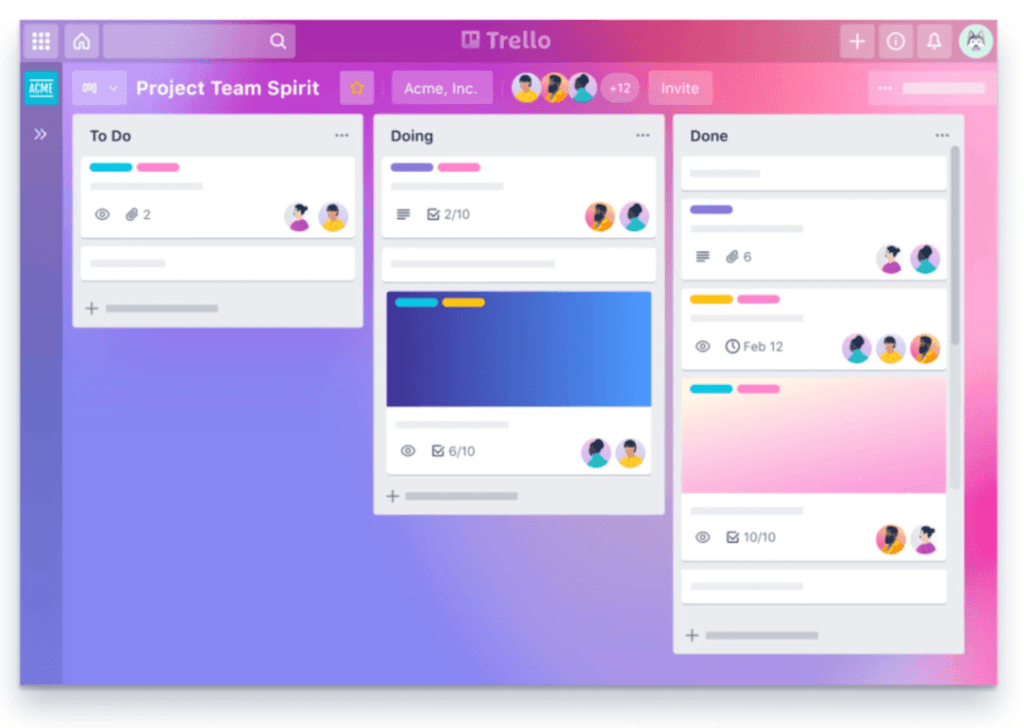
Trello uses a Kanban board system to display tasks as cards on boards. Each board represents a project or workflow.
- Cards represent individual tasks or ideas.
- Lists group cards into stages like “To Do,” “Doing,” and “Done.”
- Drag-and-drop functionality allows easy task movement between lists.
This visual layout helps users track progress quickly and clearly.
Power-ups And Integrations: Customizing Your Workflow
Trello offers Power-Ups that extend its basic features. These add-ons help customize boards to fit specific needs.
- Integrate with apps like Slack, Google Drive, and Calendar.
- Add tools for time tracking, voting, or automation.
- Enable advanced features such as custom fields or calendar views.
Users can enable multiple Power-Ups per board to create a tailored workflow.
Collaboration Tools For Teams
Trello supports team collaboration with features designed for communication and transparency.
- Assign tasks to team members with clear ownership.
- Comment directly on cards for discussion and feedback.
- Attach files and documents to keep resources in one place.
- Receive notifications about updates and deadlines.
These tools keep everyone aligned and informed throughout the project.
Simplicity And Accessibility: Easy Onboarding For Users
Trello is known for its simple interface that new users find easy to learn.
Its design uses clear icons and minimal steps to create and manage tasks. The platform is accessible on web and mobile devices, ensuring work continues anywhere.
Users can start organizing tasks without lengthy training or setup.

Credit: www.youtube.com
Pricing And Affordability Comparison
Understanding the pricing and affordability of Sunsama and Trello helps users pick the best fit. Both tools offer plans that suit different needs and budgets. This section breaks down their costs and value to help you decide.
Sunsama Pricing Plans And Value For Money
Sunsama charges a straightforward monthly fee. It focuses on daily planning and productivity for professionals.
| Plan | Price (Monthly) | Key Features |
|---|---|---|
| Individual | $20 | Daily planner, calendar integration, task management, distraction elimination |
The plan is simple but powerful. It offers a focused workspace that helps users stay calm and complete high-impact tasks.
Trello Pricing Tiers And Their Benefits
Trello offers multiple pricing tiers. They range from free to business plans, appealing to various users.
| Plan | Price (Monthly) | Key Features |
|---|---|---|
| Free | $0 | Unlimited personal boards, cards, and lists; basic automation |
| Standard | $5 | Advanced checklists, custom fields, unlimited automation |
| Premium | $10 | Dashboard, timeline, calendar views, admin controls |
| Enterprise | Starts at $17.50 | Security, user management, and advanced integrations |
Trello suits users from individuals to large teams. Its free plan is a strong option for simple needs.
Which Option Offers Better Affordability For Different User Types?
- Individuals: Sunsama offers a single, focused plan at $20/month. Trello’s free plan may suffice for basic task boards.
- Small teams: Trello Standard ($5/month) and Premium ($10/month) offer more collaboration features at lower prices.
- Large teams and enterprises: Trello Enterprise provides advanced tools and security, starting at $17.50/month per user.
- Users seeking daily planning: Sunsama’s pricing reflects its specialized features for daily focus and calm work.
Trello delivers more pricing flexibility. Sunsama provides a single, premium plan for focused daily planning.
Pros And Cons Based On Real-world Usage
Choosing between Sunsama and Trello depends on how these tools perform in daily work scenarios. Both platforms serve task management but differ in approach and features. User experiences highlight distinct strengths and weaknesses that affect productivity and workflow.
Strengths Of Sunsama: What Users Appreciate Most
- Integrated daily planner: Combines task lists with calendar views for clear day planning.
- Focus on mindfulness: Helps users stay calm and avoid burnout by managing workload realistically.
- Two-way sync with Trello: Allows dragging Trello cards into Sunsama’s schedule with automatic updates.
- Task prioritization: Encourages focusing on high-impact work instead of multitasking.
- Simple, clean interface: Reduces distractions and promotes flow during work hours.
Limitations Of Sunsama: Areas For Improvement
- Limited free plan: Some users find the pricing restrictive for long-term use.
- Learning curve: New users may need time to adjust to the daily planner format.
- Integration scope: Fewer third-party app integrations compared to competitors.
- Not ideal for complex projects: Lacks advanced features for large team collaboration.
Strengths Of Trello: Popular Features And Reliability
- Flexible board system: Visual Kanban boards suit many project types.
- Free tier: Generous free plan with core features accessible to all users.
- Wide integrations: Supports many apps like Slack, Google Drive, and more.
- Easy to use: Intuitive drag-and-drop interface for quick task updates.
- Strong collaboration: Real-time updates and comments keep teams aligned.
Limitations Of Trello: Challenges Faced By Users
- Lack of native time management: No built-in calendar or daily planner function.
- Board clutter: Large projects can become overwhelming without strict organization.
- Limited task prioritization: Difficult to highlight high-impact tasks effectively.
- Feature limitations in free version: Some power-ups and automation require paid plans.
Credit: akiflow.com
Ideal Users And Use Cases For Sunsama
Sunsama serves as a powerful daily planner combining task management and calendar features. It suits users who want clear focus and structure in their workday. The platform helps balance tasks, meetings, and priorities in one place. Below are the main user types and how they benefit from Sunsama.
Professionals Needing Structured Daily Planning
Professionals handling multiple tasks benefit from Sunsama’s organized daily view. The planner lets users:
- Break down projects into manageable daily goals
- Plan work hours with realistic time blocks
- Prioritize high-impact tasks to avoid burnout
This approach improves focus and reduces stress. Sunsama’s interface promotes a calm mindset and steady progress.
Teams Requiring Integrated Scheduling And Task Management
Teams working on shared projects find Sunsama useful for syncing tasks with calendars. Key features include:
| Feature | Benefit |
|---|---|
| Calendar and task sync | View deadlines and meetings in one place |
| Two-way integration with Trello | Drag Trello cards into Sunsama’s schedule |
| Shared daily planning | Coordinate team priorities easily |
This setup helps teams stay aligned and manage workload smoothly.
Individuals Focused On Time Blocking And Productivity Enhancement
Sunsama appeals to those who use time blocking to boost productivity. It offers:
- Easy creation of time blocks for tasks and breaks
- Visual daily layout to track progress
- Focus on completing tasks without distractions
Users gain better control over their schedule and achieve more with less stress.
Ideal Users And Use Cases For Trello
Trello suits a wide range of users who want clear and visual task management. It works well for teams and individuals who need a simple but flexible way to organize work. Its board and card system supports various project types. Trello helps users track progress and collaborate easily.
Small To Medium Teams Needing Visual Task Management
Trello is perfect for small to medium teams that rely on visual workflows. Teams can create boards for different projects and use cards to represent tasks.
- View project stages at a glance
- Move cards across columns to show progress
- Assign members, set deadlines, and add comments
This visual style helps teams stay organized and understand project status quickly. It works well for marketing groups, software developers, and event planners.
Users Seeking Customizable And Scalable Project Boards
Trello offers customizable boards that grow with project needs. Users can add:
- Checklists inside cards
- Labels and tags for priority
- Power-Ups to extend features (calendars, automation, integrations)
Boards can start simple and become more complex as projects expand. This makes Trello suitable for startups and growing businesses.
Individuals And Teams Preferring Simplicity And Flexibility
Trello appeals to users valuing ease of use. The interface is straightforward, with drag-and-drop cards and minimal setup.
Users enjoy:
- Quick task creation
- Flexible workflows for personal or team projects
- Access on desktop and mobile devices
This flexibility suits freelancers, students, and teams who want to avoid complex project tools.
Final Verdict: Sunsama Vs Trello
Choosing between Sunsama and Trello depends on your work style and needs. Both tools help organize tasks but serve different purposes. Sunsama focuses on daily planning and flow, while Trello excels in flexible project management. Understanding their strengths clarifies which fits best.
Comparative Summary Of Features And Benefits
| Feature | Sunsama | Trello |
|---|---|---|
| Main Focus | Daily planner and task manager for focus and calm | Visual project boards and task organization |
| Task Management | Integrates tasks into a daily schedule with calendar sync | Uses cards and lists for task tracking |
| Collaboration | Supports team planning with shared calendars | Strong collaboration with boards, comments, and attachments |
| Integration | Syncs with Trello, Google Calendar, and other tools | Integrates with many apps including Slack and Google Drive |
| User Interface | Clean, minimal, focused on reducing distractions | Flexible, visual, customizable with many templates |
| Pricing | Subscription-based with free trial | Free basic plan, paid upgrades for advanced features |
Which Tool Suits Different Productivity Needs Best?
- Sunsama suits professionals who want to plan daily tasks clearly.
- It helps users avoid multitasking and stay calm under pressure.
- Trello works well for teams managing multiple projects visually.
- Its flexible boards fit various workflows and collaborative tasks.
- Use Sunsama for focus and time-blocking your day.
- Choose Trello for broad project tracking and team communication.
Recommendations For Choosing Between Sunsama And Trello
- Identify your primary goal: daily focus or project overview.
- Try Sunsama if you want to schedule tasks and reduce distractions.
- Pick Trello if you need a visual, flexible tool for teamwork.
- Consider integrating both for syncing Trello tasks into Sunsama’s planner.
- Test free versions to explore which interface feels natural.
- Evaluate pricing based on your budget and feature needs.
Frequently Asked Questions
Is There Something Better Than Trello?
Better alternatives to Trello depend on your needs. Asana and monday. com excel in scalability. ClickUp offers rich features and customization. Jira suits Agile development. Notion blends docs with project management. For simplicity, try Todoist or KanbanFlow. Budget options include Freedcamp and Zoho Projects.
Does Anyone Still Use Trello?
Yes, Trello remains popular for simple project management and team collaboration worldwide. Many users appreciate its intuitive Kanban boards. It suits individuals and small teams who want easy task tracking without complex features. Trello also integrates well with various tools, keeping it relevant in 2024.
How Much Does Sunsama Cost?
Sunsama costs $20 per user monthly, billed annually. A free 14-day trial is available for new users.
Is Trello Still Good In 2025?
Trello remains a good project management tool in 2025. It suits small teams and simple workflows well. For advanced features or scaling, alternatives like Asana or monday. com may serve better. Trello’s ease of use and integrations keep it relevant and popular.
Conclusion
Choosing between Sunsama and Trello depends on your work style and needs. Sunsama blends task management with a daily planner and calendar. It helps you stay calm and focused during busy days. Trello offers a simple, visual way to organize tasks with boards and cards. You can even connect Trello with Sunsama to sync your tasks smoothly. For those who want a balanced planner and task manager, Sunsama is a solid choice. It supports focus without feeling overwhelmed. Try it to see if it fits your routine best.
