
Are you struggling to keep your tasks organized and your day on track? Choosing the right reminder app can make all the difference.
When it comes to managing your to-dos, two popular options often come up: Todoist and Apple Reminders. But which one truly fits your lifestyle and productivity needs? Whether you want a simple, seamless experience or powerful tools to boost your efficiency, understanding the strengths and limitations of each app is key. Ready to find clarity and finally take control of your tasks? Let’s dive into the Todoist vs Apple Reminders showdown and discover which app can transform your daily routine.
Introduction To Todoist And Apple Reminders
Task managers help organize daily work and personal life. They keep priorities clear and deadlines visible. Todoist and Apple Reminders are popular apps for managing tasks. Both offer unique features and serve different user needs. Understanding each tool’s purpose is key to choosing the right one.
Overview Of Todoist And Its Purpose
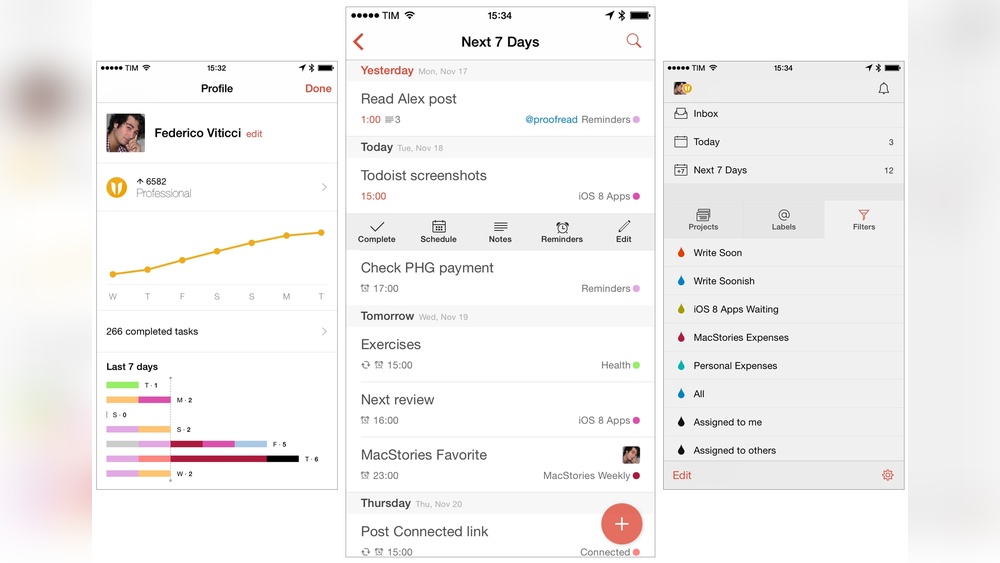
Todoist is a powerful to-do list app used by over 50 million people worldwide. It aims to bring clarity to busy lives by simplifying task management. Users can create detailed projects, set deadlines, and use natural language to add tasks quickly.
- Supports complex task organization with projects and labels
- Offers natural language input for quick task creation
- Ideal for professionals needing robust task management
- Cross-platform support including iOS, Android, Windows, and macOS
- Integrates with many apps and automation tools like IFTTT
Overview Of Apple Reminders And Its Purpose
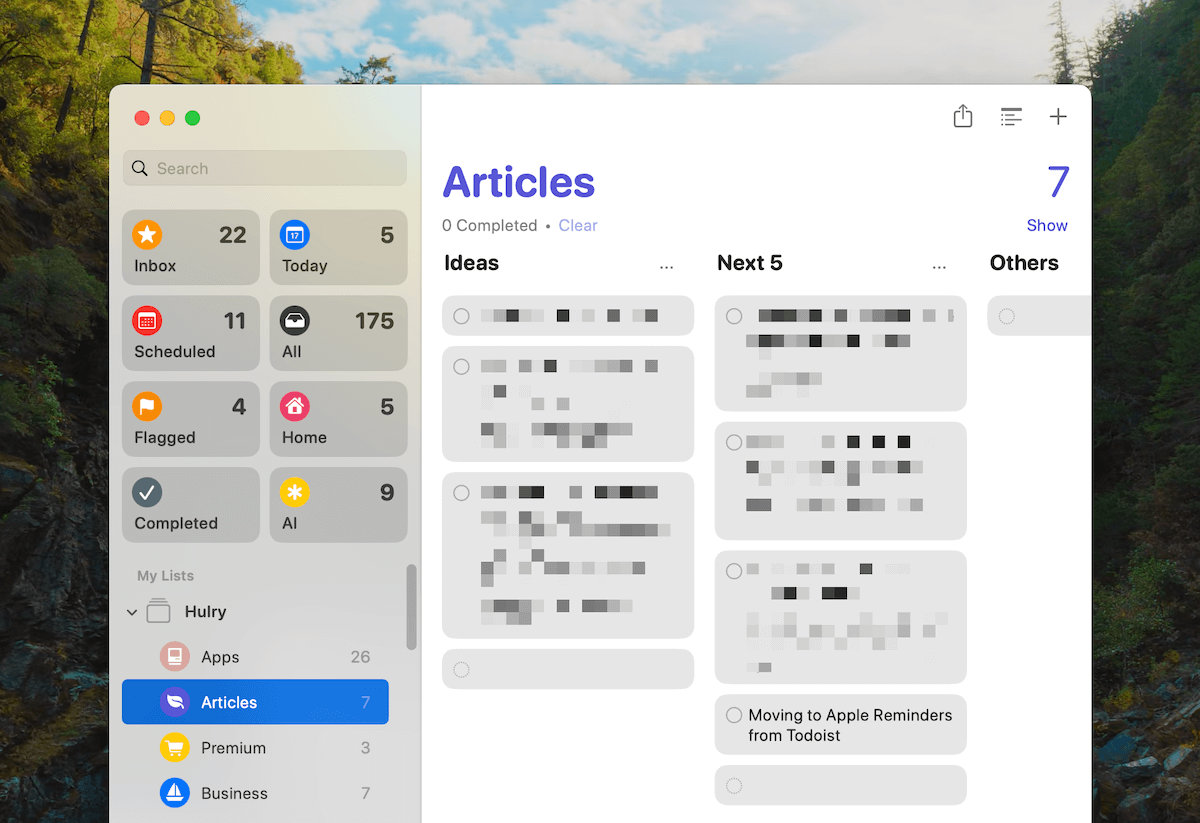
Apple Reminders is a built-in app on iOS and macOS devices. It focuses on seamless integration with Apple’s ecosystem. The app helps users track tasks with simple reminders and alerts.
- Works deeply with iPhone, iPad, and Mac features
- Allows location-based and time-based reminders
- Supports Siri voice commands for easy task entry
- Offers a clean, minimal interface for quick task tracking
- Syncs tasks across Apple devices via iCloud
Why Comparing These Two Task Managers Matters
Choosing the right task manager affects productivity and focus. Todoist suits users needing advanced tools and flexibility. Apple Reminders fits those who prefer simplicity and Apple device integration.
Comparing helps identify which app matches your style and needs. Consider these points:
| Feature | Todoist | Apple Reminders |
|---|---|---|
| Task Complexity | High – Projects, labels, filters | Basic – Simple lists and alerts |
| Platform Support | Cross-platform | Apple devices only |
| Integration | Wide app and automation support | Deep Apple ecosystem integration |
| User Interface | Feature-rich and customizable | Minimal and straightforward |
Understanding these differences guides users to a better task management experience.
Key Features Of Todoist
Todoist offers a rich set of features designed to simplify task management. It blends ease of use with powerful tools to help users stay organized and productive. The app suits both simple to-do lists and complex projects.
Each feature focuses on clarity and efficiency. The app helps create, organize, and track tasks with minimal effort.
Natural Language Input For Quick Task Creation
Todoist allows users to add tasks using natural language. Typing phrases like "Meeting tomorrow at 10am" instantly sets the task and date.
This feature speeds up task entry. No need to manually select dates or times.
Advanced Task Organization With Projects And Labels
Tasks can be grouped into projects to keep work and personal tasks separate.
Labels add another layer of organization. They help filter and find tasks quickly.
| Organization Tool | Purpose |
|---|---|
| Projects | Group related tasks in one place |
| Labels | Tag tasks by context, priority, or type |
Cross-platform Syncing And Collaboration
Todoist syncs tasks instantly across all devices: phones, tablets, and computers.
Users can share projects and assign tasks to team members. Collaboration stays smooth and transparent.
Robust Productivity Systems Support (gtd)
Todoist supports the Getting Things Done (GTD) method. It helps users capture, clarify, organize, and review tasks.
- Inbox for quick capture
- Projects for organization
- Labels for context
- Filters for custom views
Customizable Reminders And Notifications
Users set reminders by time or location. Notifications keep tasks from being forgotten.
Reminders are flexible and can be adjusted per task. This ensures timely alerts without overload.
Key Features Of Apple Reminders
Apple Reminders offers a solid set of features designed for users within the Apple ecosystem. It focuses on ease of use, smart notifications, and collaboration. The app works smoothly across all Apple devices, making it a reliable choice for task management. Its features cater well to simple to moderate task lists and timely reminders.
Deep Integration With Ios And Macos Ecosystems
Apple Reminders is built into iOS and macOS, ensuring seamless syncing across iPhones, iPads, and Macs. Tasks update automatically on all devices connected to the same Apple ID. This integration offers quick access without needing to install extra apps. It uses native system services, which means faster performance and less battery drain.
Siri And Voice Command Functionality
Users can add reminders hands-free using Siri. Just speak commands like "Remind me to call mom at 6 PM". Siri understands natural language and creates reminders instantly. This voice control makes task creation fast and convenient, especially when multitasking or on the move.
Location-based And Time-based Reminders
Apple Reminders supports both location and time triggers. Set reminders to alert you when you arrive at or leave a place. For example:
- Remind me to buy milk when I reach the grocery store.
- Remind me to send an email at 3 PM.
These smart alerts help users remember tasks exactly when needed, improving productivity and reducing missed activities.
Shared Lists For Seamless Collaboration
The app allows sharing of entire lists with family, friends, or coworkers. Everyone on the list can add, edit, or complete tasks. This feature is useful for group projects, shopping lists, or event planning. Changes sync instantly, keeping all members up to date without extra effort.
User-friendly Interface With Native App Stability
Apple Reminders has a clean, simple design that fits well with Apple’s overall interface style. The app feels familiar and easy to navigate. It uses Apple’s native app architecture, which ensures smooth performance and fewer crashes. Users benefit from a reliable, no-fuss experience on all Apple devices.
Credit: hulry.com
Pricing And Affordability Breakdown
Choosing the right task manager depends on budget and features. Both Todoist and Apple Reminders offer unique pricing structures. Understanding these helps match the app to your needs without overspending. This section compares costs and value clearly.
Todoist’s Free Vs Premium Plans And Value Proposition
Todoist offers a free plan with basic task management tools. It suits casual users who need simple to-do lists. The free version includes:
- Up to 80 active projects
- 5 people per project
- Basic task prioritization and labels
The Premium plan costs about $4 per month (billed yearly). It adds powerful features such as:
- Reminders with push notifications
- Task comments and file uploads
- Productivity trends and filters
- Automatic backups
This plan fits users needing advanced task tracking and collaboration.
Apple Reminders As A Free Built-in Solution
Apple Reminders comes free on all iOS and macOS devices. There is no paid upgrade. Features include:
- Basic task creation and scheduling
- Location-based and time-based alerts
- Integration with Apple ecosystem apps
- Shared lists for collaboration
It is ideal for users fully committed to Apple devices. No additional cost means it fits any budget.
Cost-benefit Analysis For Different User Needs
| User Type | Best Choice | Reason | Cost |
|---|---|---|---|
| Casual User | Apple Reminders | Free, simple, and integrated with Apple devices | $0 |
| Power User | Todoist Premium | Advanced features, reminders, and productivity tracking | ~$48/year |
| Team Collaboration | Todoist Premium | Project sharing, comments, and file attachments | ~$48/year |
| Apple Ecosystem Loyalist | Apple Reminders | Seamless syncing with iPhone, iPad, and Mac | $0 |
Todoist offers more features but at a cost. Apple Reminders provides a solid free base for basic needs. Choose based on feature needs and budget limits.
Pros And Cons Based On Real-world Usage
Choosing between Todoist and Apple Reminders depends on daily needs and usage style. Both apps serve the core purpose of task management but differ in features and usability. Examining their strengths and limitations from real users helps understand which fits better in everyday life.
Todoist: Strengths And Limitations In Everyday Use
Todoist stands out for its powerful task management tools. It supports natural language input, making it easy to add tasks quickly. Its support for GTD (Getting Things Done) methodology appeals to users managing complex projects.
- Strengths:
- Offers task prioritization and labels for better organization.
- Cross-platform support ensures syncing across devices.
- Integration with many apps via IFTTT enhances automation.
- Powerful reminders and recurring tasks with flexible scheduling.
- Limitations:
- Free version has limited features compared to premium.
- Interface can feel complex for casual users.
- Some advanced features require subscription.
Apple Reminders: Advantages And Drawbacks
Apple Reminders benefits from deep integration in the Apple ecosystem. It works smoothly on iOS and macOS devices, syncing effortlessly through iCloud.
- Advantages:
- Simple and clean interface, easy for beginners.
- Supports Siri voice commands for quick task creation.
- Location-based reminders enhance task relevance.
- Free and pre-installed on Apple devices.
- Drawbacks:
- Limited customization compared to Todoist.
- Fewer integrations with third-party apps.
- Lacks advanced project management features.
- Only available on Apple devices.
User Feedback And Common Pain Points
Users appreciate Todoist for handling complex tasks and projects. The ability to sync with Apple Reminders through IFTTT is a plus. Some users find Todoist’s interface overwhelming at first.
Apple Reminders users praise its simplicity and voice command support. Some express frustration with its limited features and lack of cross-platform availability.
| Aspect | Todoist Feedback | Apple Reminders Feedback |
|---|---|---|
| Ease of Use | Steep learning curve for new users | Very simple and intuitive |
| Feature Set | Rich and versatile, supports GTD | Basic, focused on reminders only |
| Integration | Works with many apps, including Apple Reminders | Limited to Apple ecosystem and few integrations |
| Platform Support | Available on multiple platforms | Apple devices only |
Credit: hulry.com
Ideal Users And Use Case Recommendations
Choosing the right task management app depends on your specific needs and habits. Both Todoist and Apple Reminders serve different user types and scenarios. Understanding who benefits most from each app helps in making the best choice. Below, find clear guidance on ideal users and use cases for these apps.
Who Should Choose Todoist: Power Users And Complex Projects
Todoist fits users who manage complex projects or need advanced task features. It supports natural language input, labels, filters, and project hierarchies. This makes it perfect for:
- Professionals handling multiple projects simultaneously
- Users following the Getting Things Done (GTD) method
- People needing task priorities and detailed organization
- Teams requiring shared projects and collaboration
Todoist’s cross-platform availability and integrations suit users wanting seamless task management across devices. Its powerful automation and reminders keep tasks clear and manageable.
Who Should Choose Apple Reminders: Apple Ecosystem Loyalists
Apple Reminders works best for users fully invested in the Apple ecosystem. It offers tight integration with iOS, macOS, and watchOS features. Ideal users include:
- Individuals using multiple Apple devices daily
- Users wanting simple, native task reminders without extra setup
- People relying on Siri voice commands for quick task entry
- Those preferring automatic syncing via iCloud
Apple Reminders delivers straightforward task tracking with location and time-based alerts. It blends smoothly with Apple apps like Calendar and Mail for easy task creation.
Scenarios Where Integration Between Both Apps Is Beneficial
Some users benefit from combining strengths of both apps. Integration through platforms like IFTTT allows syncing tasks and reminders between Todoist and Apple Reminders. Useful scenarios include:
- Using Apple Reminders for quick, voice-based task input on iPhone or Apple Watch
- Managing detailed projects and task prioritization in Todoist
- Ensuring no task is missed by syncing completed or new reminders between apps
- Automating workflow where simple reminders trigger complex Todoist actions
This integration creates a flexible system. Users enjoy Apple’s native convenience and Todoist’s powerful task management features together.
Conclusion: Making The Right Choice For Your Task Management
Choosing between Todoist and Apple Reminders shapes how you manage daily tasks. Each tool offers unique strengths for staying organized. Understanding these helps pick what fits your needs and work style best.
Summary Of Key Differences And Strengths
| Feature | Todoist | Apple Reminders |
|---|---|---|
| Platform Integration | Works on multiple platforms; syncs across iOS, Android, Windows, Mac, and web | Deep integration with iOS and macOS devices only |
| Task Management | Advanced with natural language input, labels, filters, and project views | Basic task creation with location and time reminders |
| User Interface | Clean, customizable, suited for complex workflows | Simple, minimalistic, easy for quick reminders |
| Collaboration | Supports shared projects and task comments | Limited sharing; best for personal use |
| Automation | Integrates with IFTTT and other tools for task syncing | Syncs with Todoist via IFTTT for enhanced automation |
Final Tips For Selecting Your Ultimate Task Manager
- Identify your device ecosystem first: Apple Reminders excel on Apple devices.
- Consider task complexity: Todoist suits detailed project tracking.
- Check if collaboration is important for your workflow.
- Test natural language input if quick task entry matters.
- Review available integrations to fit your productivity tools.
Encouragement To Experiment And Customize For Productivity
Try both apps for a few days. Notice which feels intuitive and helps you focus.
Adjust settings and explore features to match your habits. Customization boosts efficiency.
Use syncing options to combine strengths. For example, sync Apple Reminders with Todoist using IFTTT.
Find your ideal balance between simplicity and powerful task management.

Credit: www.effectiveretailleader.com
Frequently Asked Questions
What Is The 1/3/5 Rule In Todoist?
The 1/3/5 rule in Todoist suggests planning 1 big task, 3 medium tasks, and 5 small tasks daily. It boosts focus and productivity.
Does Todoist Sync With Apple Reminders?
Todoist does not sync directly with Apple Reminders. Use IFTTT to automate syncing between Todoist and Apple Reminders.
Which App Is Best For Reminders?
Todoist excels in advanced task management with natural language support. Apple Reminders suits iOS users with deep integration. Microsoft To Do fits simple, free Microsoft ecosystem use. Google Keep offers quick, location-based notes. TickTick combines reminders with habit tracking and Pomodoro timer.
Is Todoist Still Worth It?
Todoist remains worth it for advanced task management and productivity. It offers natural language input, robust features, and seamless integrations. Its intuitive design suits complex projects better than basic reminder apps, making it ideal for users seeking powerful organization tools.
Conclusion
Choosing between Todoist and Apple Reminders depends on your task needs. Apple Reminders works well for simple, quick reminders on iOS devices. Todoist offers powerful features like natural language input and task organization. It fits users who want more control and productivity tools. Syncing between both apps is possible using IFTTT for convenience. Explore what suits your style best. To simplify your tasks with Todoist, visit this link. Make your daily planning easier and clearer today.
