
Trying to stay on top of your tasks can feel overwhelming, especially when choosing the right tool to organize your work and life. You want something that’s simple, powerful, and actually helps you get things done without adding stress.
That’s where the showdown between Todoist and MeisterTask comes in. Both promise to boost your productivity, but which one fits your style better? Whether you prefer a clean, straightforward to-do list or a more visual, team-oriented workflow, this comparison will help you decide. Ready to find the perfect match for your productivity needs? Let’s dive into Todoist Vs MeisterTask and see which one can truly simplify your day. If you’re leaning towards a tool that millions trust for clarity and ease, check out Todoist here.

Credit: www.softwareadvice.ie
Introduction To Todoist And Meistertask
Task management tools help organize daily work and personal projects. Todoist and MeisterTask are popular choices. Both offer unique features to boost productivity. Understanding their differences can guide users to the best fit.
Overview Of Todoist And Its Purpose
Todoist is a to-do list app used by over 50 million professionals worldwide. It focuses on clarity and simplicity, letting users capture tasks quickly and stay organized.
Key features include:
- Task creation and prioritization
- Project organization with labels and filters
- Cross-device sync for seamless access
- Reminders and due dates
Todoist suits individuals needing a straightforward, powerful tool for managing daily tasks.
Overview Of Meistertask And Its Purpose
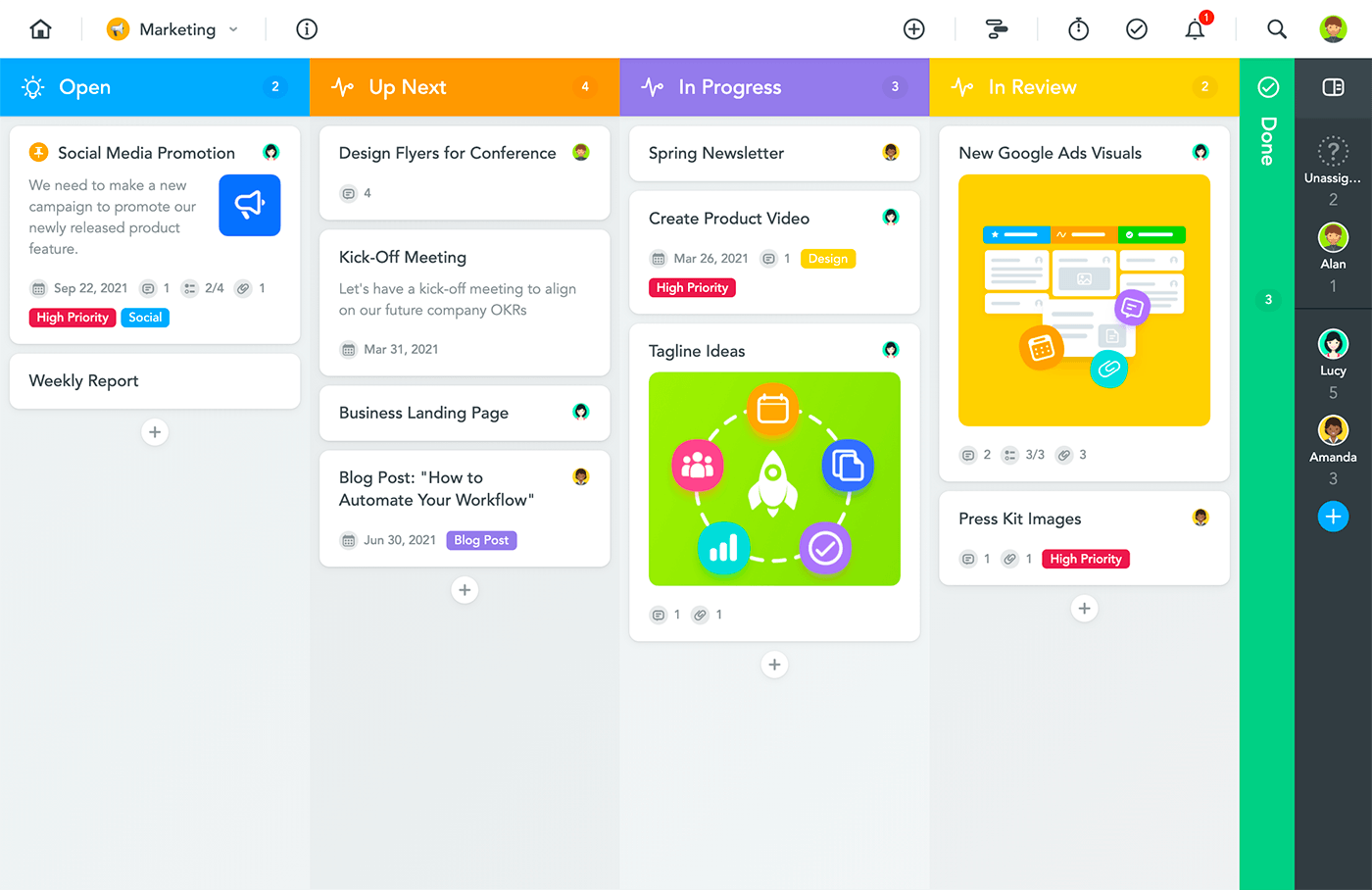
MeisterTask is a visual task and project management tool. It uses boards and customizable workflows to track progress.
Main features are:
- Kanban-style project boards
- Task assignments and comments
- Automations to reduce repetitive work
- Integration with other apps
MeisterTask fits teams and individuals who want a visual way to manage projects and collaborate.
Why Comparing These Two Task Management Tools Matters
Choosing the right tool saves time and reduces stress. Todoist and MeisterTask serve different needs:
- Todoist is best for simple, list-based task tracking.
- MeisterTask focuses on visual project workflows and team collaboration.
Understanding their strengths helps users pick a tool that matches their work style and goals.
Key Features Of Todoist
Todoist offers a blend of simplicity and powerful tools for task management. It helps users organize tasks clearly and stay on track daily. Its features are designed to support quick task capture, detailed planning, and seamless syncing across devices.
Intuitive Task Capture And Adhd-friendly Design
Todoist makes it easy to add tasks fast, avoiding forgotten duties. Its design suits ADHD brains by being both simple and visual. Users can enter tasks quickly, which helps manage daily responsibilities better.
The interface uses colors and clear layouts to reduce overwhelm. This helps users focus on one task at a time, improving productivity.
Robust Digital Planning With Calendar View And Task Reminders
Todoist includes a calendar view to see all tasks and deadlines clearly. This visual planning tool helps users organize work and personal life efficiently.
- Task reminders alert users about upcoming deadlines.
- Task durations help estimate how long work will take.
- Recurring tasks automate repeated activities.
These features keep users aware of their schedule and deadlines, reducing stress.
Cross-platform Accessibility And Synchronization
Todoist works on many devices, including smartphones, tablets, and computers. It syncs tasks instantly across all platforms.
This means users can:
- Add a task on one device.
- Access and complete it on another device.
- Keep their task list up-to-date everywhere.
The smooth sync ensures no tasks are lost or forgotten.
Customizable Themes And Automatic Backups
Todoist lets users change its look with customizable themes. This personalizes the app and makes task management more enjoyable.
Automatic backups protect task data. Users never lose their lists or progress.
| Feature | Benefit |
|---|---|
| Customizable Themes | Personalizes the user experience |
| Automatic Backups | Protects task data from loss |
Key Features Of Meistertask
MeisterTask stands out as a task and project management tool that focuses on clarity and flexibility. It offers features designed to simplify workflows and improve team collaboration. Below are some key features that make MeisterTask a strong choice for managing projects effectively.
Visual Task Management And Workflow Customization
MeisterTask uses a visual board system that displays tasks as cards. Users can drag and drop these cards across customizable project stages.
- Kanban-style boards help track progress clearly.
- Task cards show details like deadlines, assignees, and tags.
- Workflows can be tailored with custom sections and statuses.
- Automations speed up repetitive actions within workflows.
This visual and customizable approach allows teams to adapt the tool to their unique project needs.
Strong Integration With Mindmeister For Mind Mapping
MeisterTask integrates seamlessly with MindMeister, a popular mind mapping tool. This integration helps users translate ideas into tasks easily.
- Create mind maps to brainstorm and organize ideas visually.
- Turn mind map nodes directly into MeisterTask tasks.
- Maintain a clear connection between planning and execution.
This feature supports teams in moving from creative thinking to actionable steps quickly.
Collaborative Project Tracking And Reporting
Team collaboration is central to MeisterTask. It provides tools that keep everyone updated on project progress.
- Task comments allow real-time communication within tasks.
- Activity streams show all recent changes and updates.
- Reporting features include progress charts and workload overviews.
- Shared dashboards offer visibility into multiple projects at once.
These tools help teams stay aligned and manage deadlines effectively.
Ease Of Setup And Administration
MeisterTask is designed for quick setup and easy management.
- Simple onboarding process with clear instructions.
- Intuitive interface reduces learning time for new users.
- Admin controls allow easy user and permission management.
- Flexible plans accommodate small teams to large enterprises.
Administrators can manage projects and users without complex configurations.
Pricing And Affordability Breakdown
Choosing the right task management tool depends a lot on pricing and value.
Both Todoist and MeisterTask offer multiple plans to fit different needs.
This section explains their pricing models and helps you find the best fit for your budget.
Todoist Pricing Plans And Value For Money
Todoist provides a simple pricing structure with a free option and paid upgrades.
| Plan | Price (per month) | Main Features |
|---|---|---|
| Free | $0 | Basic task management, up to 80 active projects, 5 people per project |
| Pro | $4 | Reminders, labels, filters, up to 300 projects, 25 people per project |
| Business | $6 | Team inbox, admin controls, team billing, priority support |
Pro plan is ideal for individuals who want enhanced features.
Business plan fits teams needing collaboration and control.
Meistertask Pricing Tiers And Cost Considerations
MeisterTask also offers a free plan and paid subscriptions with advanced features.
| Plan | Price (per month) | Main Features |
|---|---|---|
| Basic | $0 | Unlimited tasks, 3 project templates, limited integrations |
| Pro | $8.25 | Unlimited project templates, timeline & calendar views, integrations |
| Business | $20.75 | Advanced automation, custom fields, roles & permissions |
| Enterprise | Custom Pricing | Tailored features, dedicated support, security options |
The free Basic plan suits casual users.
Pro and Business plans target professionals and organizations with deeper needs.
Comparative Analysis Of Pricing Flexibility And Features
- Todoist offers lower starting prices, making it budget-friendly.
- MeisterTask has more costly tiers but includes more visual project tools.
- Todoist’s free plan supports smaller teams better than MeisterTask’s Basic plan.
- MeisterTask’s Business plan provides advanced automation not in Todoist Business.
- Both platforms offer team plans, but MeisterTask’s higher tiers add more custom controls.
Choose Todoist for simple, affordable task tracking.
Pick MeisterTask for rich features and advanced project management.
Pros And Cons Based On Real-world Usage
Choosing the right task management app depends on how it performs in daily use. User experiences reveal clear strengths and some limitations for both Todoist and MeisterTask. Understanding these helps find the best fit for your workflow.
Strengths And Limitations Of Todoist From User Reviews
Todoist wins praise for its simplicity and speed. Users find it easy to add and organize tasks quickly. The app suits those who want a clean, straightforward to-do list without distractions.
- Strengths:
- Intuitive interface for quick task capture
- Effective for managing daily responsibilities
- Works well for users with ADHD due to simplicity
- Syncs smoothly across multiple devices
- Limitations:
- Limited visual project planning features
- Calendar view and task durations require Pro plan
- Some users want more customization options
Strengths And Limitations Of Meistertask From User Feedback
MeisterTask stands out for its visual project boards and team collaboration tools. Users appreciate the clear workflow views and task tracking with drag-and-drop ease.
- Strengths:
- Visual Kanban-style boards for task management
- Strong team collaboration features
- Free plan offers useful basic tools
- Good for managing complex projects
- Limitations:
- Some find the interface less intuitive initially
- Advanced features locked behind paid plans
- Performance can slow with large projects
Overall Usability And Performance Insights
| Feature | Todoist | MeisterTask |
|---|---|---|
| Ease of Use | High – clean and simple | Medium – requires some learning |
| Task Visualization | List-based, minimal visuals | Kanban boards, visual workflows |
| Collaboration | Basic sharing and comments | Strong team collaboration tools |
| Mobile Performance | Fast and responsive | Good but may lag in complex projects |
| Pricing Impact | More features with Pro subscription | Many advanced features in paid plans |
Users seeking quick task entry and simple lists favor Todoist. Those managing team projects and visual workflows prefer MeisterTask. Both apps have free options, but unlocking full potential often requires payment.
Credit: www.saasworthy.com
Ideal Users And Use Case Recommendations
Choosing the right task management tool depends on your work style and team needs. Both Todoist and MeisterTask serve different users and use cases effectively. Understanding who benefits most from each platform helps improve daily productivity and task organization.
Who Should Choose Todoist: Freelancers, Small To Large Businesses, And Adhd Users
Todoist suits a wide range of users, from freelancers to enterprises. Its simple and powerful interface works well for managing both personal and professional tasks.
- Freelancers: Quickly capture ideas and deadlines, keeping projects on track.
- Small to Large Businesses: Scalable task management with priority levels and productivity tracking.
- ADHD Users: Intuitive design helps capture tasks instantly, reducing forgetfulness and improving focus.
Todoist’s clean layout and smart reminders make it easy to stay organized without overwhelming complexity. It supports multiple platforms, which helps users stay connected on the go.
Who Should Opt For Meistertask: Visual Thinkers, Teams Needing Collaboration And Mind Mapping
MeisterTask targets users who prefer a visual task management experience. Its kanban-style boards and mind-mapping features enhance teamwork and brainstorming.
- Visual Thinkers: Use colors, tags, and custom workflows to organize tasks visually.
- Teams Needing Collaboration: Real-time updates and easy task assignments keep everyone aligned.
- Mind Mapping: Connect ideas and tasks visually, helping teams plan complex projects clearly.
MeisterTask’s free tier covers basic collaboration needs. Paid plans add automation and advanced integrations, boosting team efficiency.
Scenario-based Recommendations For Maximizing Productivity
| Scenario | Recommended Tool | Why |
|---|---|---|
| Individual managing simple daily tasks | Todoist | Easy task entry, reminders, and priority flags |
| Creative team planning a project with brainstorming | MeisterTask | Visual boards and mind mapping support collaboration |
| Business tracking multiple projects with deadlines | Todoist | Robust project organization and reporting tools |
| Team needing real-time updates and task assignments | MeisterTask | Seamless collaboration with visual progress tracking |
| User with ADHD managing daily responsibilities | Todoist | Simple interface and quick task capture reduce forgetfulness |
Choosing the right tool depends on work style, team size, and task complexity. Both platforms offer unique strengths to boost productivity.
Conclusion: Choosing The Right Task Management Tool For You
Picking the right task management app shapes your daily workflow and productivity. Both Todoist and MeisterTask offer unique features that fit different work styles. Understanding their strengths helps you choose the best fit for your needs.
Summary Of Key Differences And Strengths
| Feature | Todoist | MeisterTask |
|---|---|---|
| User Interface | Simple, minimal, and easy to use | Visual, board-based, and intuitive |
| Task Management | Quick task entry, powerful to-do list | Project boards with flexible workflows |
| Best For | Individuals needing clarity and fast task capture | Teams requiring visual collaboration and project tracking |
| Pricing | Free and Pro plans with added features | Free, Pro, Business, and custom Enterprise plans |
| Special Features | ADHD-friendly design, reminders, automatic backups | Customizable workflows, project timelines, integrations |
Final Thoughts On Matching Features To User Needs
Todoist excels at keeping tasks simple and clear. It suits users who want to capture tasks quickly and stay organized without distraction. Its design helps users manage daily tasks efficiently.
MeisterTask fits better for teams and projects needing a visual workflow. It supports collaboration with boards and project timelines. This tool works well for those who prefer seeing tasks in stages.
Choose based on your work style. For straightforward task lists, Todoist is ideal. For visual project management and teamwork, MeisterTask stands out.
Next Steps For Trying And Adopting Your Chosen Tool
- Visit the official websites: Todoist or MeisterTask.
- Sign up for free plans to explore basic features.
- Test core functions like task creation, reminders, or project boards.
- Evaluate which interface feels natural and boosts your productivity.
- Consider premium plans if you need advanced tools like backups or custom workflows.
- Start small: add daily tasks or simple projects to build habit.
- Adjust settings and explore integrations as you grow familiar.
Trying both helps you understand which tool fits your routine best. Consistent use brings clarity and focus to your work.
Credit: www.nuclino.com
Frequently Asked Questions
What Is The 1/3/5 Rule In Todoist?
The 1/3/5 rule in Todoist helps prioritize daily tasks: 1 big task, 3 medium tasks, and 5 small tasks. It boosts focus and productivity.
How Much Does Meistertask Cost?
MeisterTask offers a free Basic plan. Paid plans include Pro at $8. 25/month and Business at $20. 75/month, billed annually. Enterprise pricing is custom.
Is Todoist Adhd Friendly?
Todoist supports ADHD users by offering intuitive, visual task management. It helps capture tasks quickly and stay organized daily.
Is Todoist Still Worth It?
Todoist remains worth it for simple task management and robust productivity features. Its Pro version adds calendar view, reminders, and backups, enhancing work and life organization effectively.
Conclusion
Choosing between Todoist and MeisterTask depends on your needs and style. Todoist offers simple, clear task management that fits both personal and work life. MeisterTask provides a visual, team-focused approach with strong mind-mapping links. For those who want a straightforward, easy-to-use to-do list app, Todoist stands out. Its features help keep tasks organized without confusion. Explore Todoist for clarity and smooth task handling by visiting this link. Make your choice based on what suits your workflow best.
