
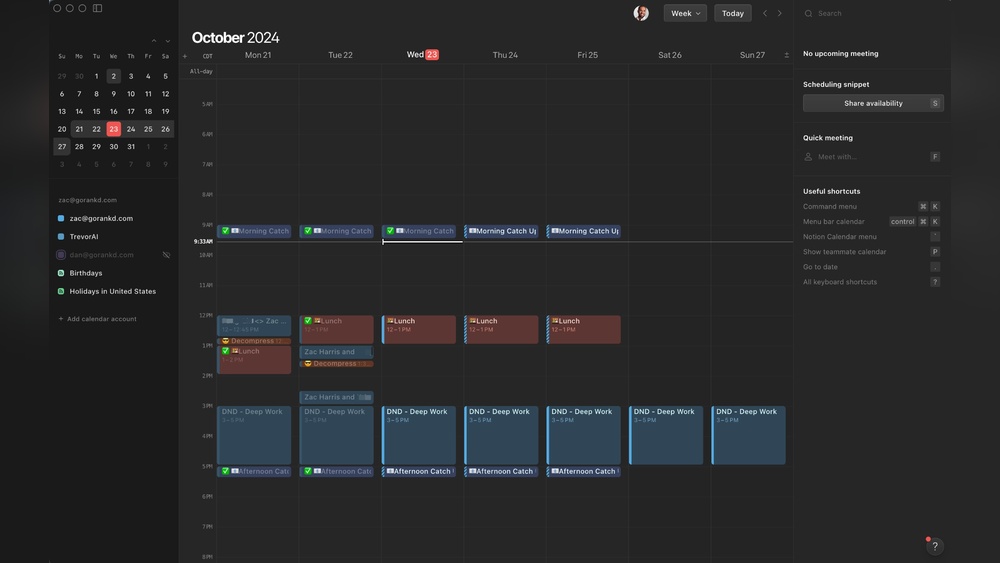
Are you struggling to keep your projects on track without juggling multiple apps? Imagine having one powerful tool that not only organizes your tasks but also adapts your schedule automatically as priorities change.
That’s exactly what ClickUp’s dynamic scheduling features bring to your workflow. With smart automation, real-time adjustments, and AI-powered time estimates, ClickUp helps you plan your day effortlessly and focus on what truly matters. Ready to transform how you manage your time and boost your productivity? Discover how ClickUp’s dynamic scheduling can make every minute count. Start maximizing your productivity today with ClickUp.
Introduction To Clickup’s Dynamic Scheduling Features
ClickUp’s dynamic scheduling features simplify project planning. They help organize tasks, set dates, and adjust timelines automatically. This makes managing projects easier and keeps teams on track. Dynamic scheduling adapts to changes, saving time and reducing errors.
Overview Of Clickup As A Productivity Tool
ClickUp combines many work tools into one platform. It replaces multiple apps by offering task management, docs, chats, and calendars in a single place. Its design helps teams plan, track, and complete work faster.
- Task and project management
- Customizable dashboards and views
- Built-in collaboration tools
- Automation to reduce manual work
- Integrations with popular apps
The platform suits teams of all sizes. Its flexible setup supports various workflows. ClickUp’s goal is to maximize human productivity by centralizing work.
Purpose And Importance Of Dynamic Scheduling In Project Management
Dynamic scheduling adjusts project plans automatically. It changes task start and due dates based on real-time updates. This keeps the schedule accurate and realistic.
Key benefits include:
| Benefit | Description |
|---|---|
| Time Efficiency | Reduces manual task rescheduling and planning time. |
| Flexibility | Automatically adapts to delays or early completions. |
| Improved Accuracy | Keeps timelines updated with real task progress. |
| Resource Management | Helps balance workload by adjusting task timing. |
Dynamic scheduling supports better decision-making. It lets managers react quickly to changes. Teams stay aligned with clear, updated deadlines.
Key Dynamic Scheduling Features Of Clickup
ClickUp offers a set of dynamic scheduling features designed to help teams plan, adjust, and execute work efficiently. These tools automate task planning, manage dependencies, and optimize resource use. They keep projects on track by adapting schedules in real-time and providing clear visual insights.
Auto-schedule: How Clickup Automatically Plans Your Workload
ClickUp’s Auto-Schedule feature automatically assigns tasks to the best available time slots. It considers your current workload and deadlines. This reduces manual planning and helps balance work evenly throughout your day or week.
- Automatically suggests time blocks for tasks
- Adjusts schedules based on priorities
- Prevents overbooking by managing task load
Dynamic Rescheduling: Adapting To Changes In Real-time
When plans change, ClickUp’s Dynamic Rescheduling shifts tasks automatically. It updates task dates and times immediately after delays or new task additions. This keeps your project timeline accurate without manual edits.
- Real-time updates for task dates
- Maintains project flow despite changes
- Reduces risk of missed deadlines
Task Dependency Automation: Keeping Deadlines And Tasks Connected
ClickUp links tasks with dependency automation. When one task is delayed, dependent tasks adjust accordingly. This feature ensures every task starts only after the prior one finishes, protecting deadlines.
- Automatically adjusts dependent task dates
- Visualizes task relationships clearly
- Prevents scheduling conflicts
Skip Non-working Days Feature: Optimizing Your Schedule Around Work Hours
ClickUp lets you skip non-working days like weekends or holidays in your schedule. Tasks will only be planned on active workdays, making your timeline realistic and easier to follow.
- Excludes weekends and holidays automatically
- Matches your team’s actual working hours
- Improves deadline accuracy
Ai-powered Time Estimates And Smart Scheduling Assistance
ClickUp uses AI to provide time estimates for tasks based on past data. It offers smart suggestions for when to schedule work, helping users plan better and avoid overload.
- AI estimates task duration
- Suggests optimal task order and timing
- Supports balanced daily workloads
Multi-calendar Integration: Consolidating Your Tasks And Events Seamlessly
Integrate multiple calendars in ClickUp to view all tasks and events in one place. This multi-calendar integration ensures no conflicts between meetings and task deadlines.
| Calendar Type | Benefits |
|---|---|
| Google Calendar | Sync meetings and deadlines |
| Outlook Calendar | Combine work events with tasks |
| ClickUp Native Calendar | Manage all projects natively |
Dynamic People Fields: Automating Resource Allocation
Dynamic People Fields in ClickUp assign tasks automatically based on team member availability and skills. This feature improves resource management and speeds up task delegation.
- Automates task assignment
- Matches tasks to the right team members
- Balances workload among people
Duration And Workload Views: Visualizing Time And Effort Requirements
ClickUp offers Duration and Workload Views to show how much time each task requires. These views help users and managers understand effort distribution and plan accordingly.
- Displays task duration clearly
- Shows team member workload at a glance
- Supports better time management decisions
Pricing And Affordability Of Clickup Scheduling Features
ClickUp offers several pricing plans that include dynamic scheduling tools. These plans suit different needs and budgets. Understanding the pricing helps users choose the best option for their workflow and team size. The affordability of scheduling features can improve productivity without overspending.
Overview Of Clickup’s Pricing Plans
ClickUp provides four main pricing plans:
- Free Plan: Basic features with limited scheduling options.
- Unlimited Plan: Most scheduling features unlocked, ideal for growing teams.
- Business Plan: Advanced scheduling and automation for larger teams.
- Business Plus Plan: Enhanced collaboration and resource management tools.
| Plan | Price (per user/month) | Key Features |
|---|---|---|
| Free | $0 | Basic task scheduling, limited calendar views |
| Unlimited | From $5 | Unlimited scheduling, time tracking, integrations |
| Business | From $12 | Advanced scheduling, automation, workload management |
| Business Plus | From $19 | All Business features plus resource allocation |
Which Scheduling Features Are Included In Each Plan
The scheduling features vary by plan level. Here is what each plan offers:
- Free Plan: Basic calendar, manual task scheduling, reminders.
- Unlimited Plan: Dynamic scheduling, task dependencies, time estimates.
- Business Plan: Automation for rescheduling, workload balancing, multiple calendar views.
- Business Plus Plan: Resource management, advanced time blocking, team capacity planning.
Dynamic scheduling starts with the Unlimited Plan. Automation and workload features appear in Business plans. Resource management tools are exclusive to Business Plus.
Evaluating Cost Vs. Productivity Gains For Different User Types
Different users see different value from ClickUp’s pricing plans:
- Freelancers: Free or Unlimited plans offer enough features for solo projects.
- Small Teams: Unlimited plan balances cost and dynamic scheduling well.
- Mid-Sized Businesses: Business plan adds automation that saves time and reduces errors.
- Large Enterprises: Business Plus plan supports complex projects and resource allocation.
Investing in higher-tier plans often results in faster project completion and less manual planning.
Cost versus productivity shows clear benefits. The right plan depends on the size and complexity of work. Small teams may find Unlimited sufficient. Larger teams gain more from Business or Business Plus plans.

Credit: www.morgen.so
Pros And Cons Of Clickup’s Dynamic Scheduling
ClickUp’s dynamic scheduling offers smart ways to manage tasks and projects. It adjusts task timing based on priorities and availability. This feature helps users stay organized and meet deadlines with less effort. Understanding the advantages and drawbacks is key to using it well.
Advantages Based On Real-world Usage And User Feedback
- Automatic Task Adjustment: Tasks shift automatically when priorities or deadlines change.
- Time Optimization: Suggested time blocks fit users’ calendars to improve productivity.
- Multi-Calendar Integration: Combines different calendars to avoid conflicts and overlaps.
- Skip Non-Working Days: Scheduling respects weekends and holidays, preventing task overload.
- Energy Level Consideration: Tasks can be matched with user energy patterns for better focus.
- Clear Visual Layout: The calendar view is intuitive, making task management simpler.
- Real-Time Updates: Changes reflect instantly across devices and team members.
Limitations And Challenges Users May Encounter
- Learning Curve: New users might find dynamic scheduling complex at first.
- Over-Automation Risk: Automatic shifts can cause confusion without manual oversight.
- Limited Customization: Some users want more control over scheduling rules.
- Performance Issues: Large projects can slow down calendar responsiveness.
- Integration Gaps: Not all third-party calendars sync perfectly.
- Mobile Experience: Scheduling features are less smooth on mobile apps.
Comparisons With Other Scheduling Tools In The Market
| Feature | ClickUp | Trello | Asana | Microsoft Planner |
|---|---|---|---|---|
| Dynamic Rescheduling | Yes – Auto-adjusts tasks | No – Manual scheduling only | Partial – Limited automation | No – Static scheduling |
| Multi-Calendar Integration | Strong – Syncs with various calendars | Basic – Limited sync options | Good – Integrates with Google Calendar | Moderate – Works within Microsoft ecosystem |
| User Interface | Comprehensive, may feel complex | Simple, user-friendly | Clean, task-focused | Basic, straightforward |
| Task Prioritization | Advanced – Auto-prioritizes and schedules | Manual prioritization only | Manual and rule-based | Manual prioritization |
| Mobile Scheduling Features | Limited functionality | Good usability | Good usability | Basic features |
Ideal Users And Use Cases For Clickup’s Dynamic Scheduling
ClickUp’s Dynamic Scheduling adapts to changing priorities and timelines. It suits various industries and team sizes. Users who need flexible, automatic task management find it valuable. This feature shifts tasks based on workload and deadlines, saving time and reducing stress.
Teams and individuals benefit from smooth scheduling that updates in real time. The tool fits both simple and complex workflows. Its versatility supports project managers, freelancers, and large enterprises alike.
Best Fit Industries And Team Sizes
| Industry | Team Size | Why ClickUp Scheduling Fits |
|---|---|---|
| Technology & Software | Small to Large | Handles fast-paced projects with shifting deadlines |
| Marketing & Advertising | Medium to Large | Manages campaigns and multiple client schedules easily |
| Consulting & Freelance | Solo to Small | Offers flexible task adjustments for diverse clients |
| Education & Non-Profit | Small to Medium | Supports event planning and volunteer coordination |
Use Cases: From Small Teams To Large Enterprises
- Small Teams: Quickly reschedule tasks as priorities shift. Keep everyone aligned with automatic updates.
- Medium Teams: Coordinate multiple projects with shared calendars. Avoid conflicts by visualizing team availability.
- Large Enterprises: Manage complex workflows and dependencies. Use dynamic scheduling to balance workloads and deadlines.
Dynamic scheduling helps teams reduce manual updates. It improves communication and saves time across all sizes.
How Freelancers And Consultants Can Benefit
Freelancers handle many clients with changing needs. ClickUp adjusts task times based on new priorities.
- Auto-schedule client work without constant manual changes
- Block time for meetings and breaks easily
- Track deadlines and manage energy levels for better focus
Consultants use it to balance multiple projects. It keeps tasks organized and deadlines clear.
Recommendations For Maximizing Productivity With Clickup Scheduling
- Set clear task priorities: Use priority labels to guide dynamic scheduling choices.
- Define working hours: Mark non-working days to avoid scheduling conflicts.
- Use buffers: Add breaks between tasks to prevent overload.
- Integrate calendars: Sync personal and team calendars for full visibility.
- Regularly review schedules: Adjust priorities and durations based on progress.
Following these steps helps teams stay on track. Dynamic scheduling becomes a tool for smooth, efficient project delivery.

Credit: www.creatio.com
Conclusion: Boosting Productivity Instantly With Clickup’s Dynamic Scheduling
ClickUp’s dynamic scheduling transforms how teams manage time and tasks. It adapts plans automatically, helping users stay on track without manual updates. This feature reduces stress and improves focus on important work.
Summary Of Key Benefits And Features
- Auto-scheduling: Tasks are placed into available time blocks based on priority and deadlines.
- Dynamic rescheduling: Adjusts task times automatically when changes occur, keeping your plan current.
- Multi-calendar integration: Combines events and tasks from different calendars for a unified view.
- Skip non-working days: Ensures tasks are not scheduled during weekends or holidays.
- Task duration management: Calculates realistic time needed for each task to avoid overload.
- Priority-based scheduling: High priority tasks receive better time slots automatically.
- Buffers and breaks: Inserts rest periods to maintain energy and prevent burnout.
| Feature | Benefit |
|---|---|
| Auto-Schedule | Saves time by assigning tasks to free slots instantly. |
| Dynamic Rescheduling | Keeps your plan flexible and up to date. |
| Multi-Calendar Integration | Unifies personal and work calendars for better planning. |
| Priority Management | Focuses your day on what matters most. |
Final Thoughts On Leveraging Clickup For Efficient Scheduling
ClickUp’s dynamic scheduling helps teams manage time wisely. It removes guesswork in planning by automating task placement.
Users can focus on work, not on juggling schedules. The flexible system adapts to sudden changes smoothly.
Efficient scheduling supports better teamwork and timely project delivery. This feature fits perfectly into any productivity toolkit.
Try using ClickUp to organize your daily tasks and watch your productivity grow.

Credit: thebusinessdive.com
Frequently Asked Questions
What Are Clickup’s Dynamic Scheduling Features?
ClickUp’s dynamic scheduling features automate task timing based on priorities and dependencies. They adjust deadlines and durations in real-time to keep projects on track efficiently.
How Does Clickup Handle Task Dependencies Dynamically?
ClickUp automatically reschedules dependent tasks when changes occur. This ensures your project timeline updates instantly without manual adjustments, maintaining workflow consistency.
Can Clickup Schedule Around Non-working Days?
Yes, ClickUp allows you to skip non-working days during scheduling. This helps create realistic timelines by avoiding weekends and holidays in task planning.
Does Clickup Offer Ai-powered Scheduling Assistance?
ClickUp includes AI tools that generate personalized schedules. The AI considers priorities, time estimates, and calendar availability to optimize your daily work plan.
Conclusion
ClickUp’s dynamic scheduling features help organize tasks clearly and simply. You can set task durations, skip non-working days, and easily adjust schedules. This keeps projects on track without confusion or extra effort. The calendar suggests time blocks, helping you focus on priorities. Managing your work becomes smoother and less stressful. Explore how these tools improve your daily planning. Try ClickUp today and see how it fits your workflow. Learn more at ClickUp.
