
Are you trying to find the perfect tool to boost your productivity and keep all your work organized? Choosing between ClickUp and Anytype might feel tricky, especially when both promise to simplify how you manage your tasks and notes.
But what if one of them could truly replace multiple apps you currently use, bringing everything—your tasks, notes, and even AI agents—into one seamless space? You’ll discover the real differences between ClickUp and Anytype, helping you decide which platform fits your style best. Ready to transform how you work? Let’s dive in and see why ClickUp might be exactly what your productivity toolkit is missing.
Introduction To Clickup And Anytype
Choosing the right productivity tool can shape how you work and organize information. ClickUp and Anytype serve distinct roles in managing tasks and knowledge.
This section introduces both platforms, highlighting their core purposes and main functions. Understanding these will help you decide which fits your needs better.
Overview Of Clickup: Purpose And Core Functionality
ClickUp is designed as a comprehensive project management tool. It aims to maximize productivity by combining tasks, docs, goals, and chat in one place.
- Replace multiple apps with a unified platform.
- Organize projects with tasks and subtasks.
- Integrate notes directly into task management.
- Use automation and AI agents to save time.
- Suitable for teams of all sizes and individual users.
The platform focuses on streamlining workflows and improving team collaboration through customizable views and rich features.
Overview Of Anytype: Purpose And Core Functionality
Anytype centers on personal knowledge management. It helps users create and connect notes in a flexible, local-first environment.
- Focus on building an interconnected knowledge base.
- Works offline with local data storage for privacy.
- Supports rich note-taking with multimedia content.
- Emphasizes linking different types of information easily.
- Ideal for users wanting a personal, secure workspace.
Anytype aims to help users organize thoughts and data naturally, rather than managing tasks or projects.
Key Differences Between Clickup And Anytype
| Feature | ClickUp | Anytype |
|---|---|---|
| Primary Use | Project and task management with integrated notes | Personal knowledge management and note interconnection |
| Data Storage | Cloud-based, team collaboration focused | Local-first, offline-friendly for privacy |
| Key Features | Task tracking, automation, goals, chat, AI agents | Flexible note linking, multimedia notes, knowledge graph |
| Best For | Teams managing projects and workflows | Individuals building a personal knowledge base |
| Collaboration | Strong, with real-time updates and sharing | Limited, more focused on personal use |
Credit: www.fahimai.com
Unique Features Of Clickup
ClickUp offers a rich set of features that help teams manage projects and tasks efficiently. It combines project management with note-taking and automation tools. These features help users stay organized and productive in one platform.
Comprehensive Project Management And Task Tracking
ClickUp provides a detailed system for managing projects and tracking tasks. Users can create tasks, subtasks, and checklists with deadlines and priorities. The platform supports task dependencies and time tracking.
- Set priorities and due dates for each task
- Track time spent on tasks with built-in timers
- Manage task dependencies to keep workflows smooth
- Use task statuses to monitor progress
This makes project management clear and simple, allowing teams to meet deadlines and goals effectively.
Customizable Views And Visual Tools For Enhanced Focus
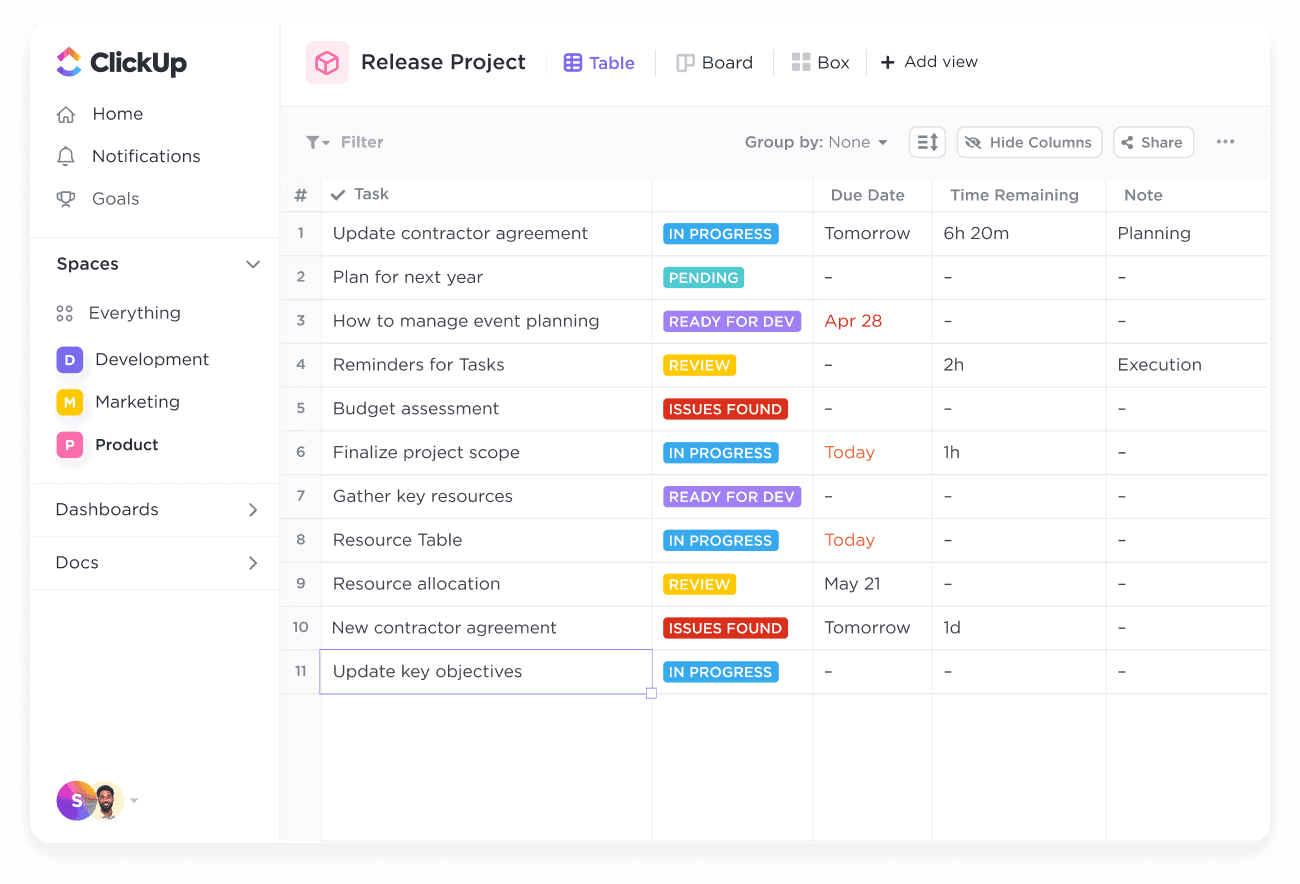
ClickUp offers multiple views to fit different work styles. Users can switch between List, Board, Calendar, Gantt, and Box views. Each view gives a different way to visualize tasks and projects.
| View | Purpose |
|---|---|
| List | Detailed task lists with filters and sorting |
| Board | Kanban-style task cards for visual workflow |
| Calendar | Schedule tasks by dates and deadlines |
| Gantt | Timeline view for project planning and tracking |
| Box | Overview of workload per team member |
Users can customize filters and sorting to focus on what matters most. This flexibility helps improve concentration and task management.
Integration Of Notes Within Task And Project Workflows
ClickUp integrates note-taking directly into tasks and projects. Notes can be linked to tasks for better context and clarity. Users can:
- Create rich-text notes inside tasks
- Attach documents and images to notes
- Organize notes with folders and tags
- Collaborate by commenting on notes and tasks
This feature keeps important information close to the work, reducing the need to switch apps.
Templates And Automation To Streamline Productivity
ClickUp provides templates and automation to speed up work processes. Templates can be used for tasks, projects, and documents. Automation rules reduce manual work by triggering actions automatically.
- Use ready-made templates for common workflows
- Create custom templates to match team needs
- Automate task assignments, status changes, and notifications
- Save time by minimizing repetitive tasks
These tools help maintain consistency and free up time for more important work.
Unique Features Of Anytype
Anytype stands out for its innovative approach to personal knowledge management. It offers a unique blend of privacy, connectivity, and flexibility. These features make it distinct from traditional project management tools like ClickUp. Anytype focuses on giving users full control over their data while enabling deep connections between different types of information.
Local-first Architecture For Data Privacy And Control
Anytype uses a local-first architecture, meaning your data is stored primarily on your device. This design ensures maximum privacy and control.
- Your notes and files stay on your device by default.
- Data is encrypted and synced securely when online.
- No reliance on third-party servers for storage.
This approach protects sensitive information and reduces risks of data breaches.
Interconnected Notes For Personal Knowledge Management
Anytype excels at creating interconnected notes. Instead of isolated documents, it links ideas and information.
- Notes connect via bidirectional links, showing relationships.
- Users can build a personal knowledge graph with ease.
- Navigation between related topics becomes fast and intuitive.
This system helps users organize thoughts and remember connections better.
Flexibility In Connecting Different Types Of Information
Anytype allows users to link various data types beyond text notes. The platform supports:
| Information Type | Use Case |
|---|---|
| Text Notes | Document ideas and knowledge |
| Tasks | Track personal to-dos |
| Files | Attach important documents |
| Media | Embed images and videos |
Users can create connections between these types for a flexible, custom system.
Offline Accessibility And Synchronization Benefits
Anytype works fully offline. You can access and edit your data anytime.
- Changes sync automatically when online.
- Offline work is seamless and uninterrupted.
- Syncing is secure and respects privacy.
This feature suits users with unstable internet or high privacy needs.

Credit: clickup.com
Pricing And Affordability Comparison
Choosing the right productivity tool depends heavily on pricing and value. Both ClickUp and Anytype offer unique pricing models tailored to different user needs. Understanding these plans helps pick the best fit for your budget and requirements.
Clickup Pricing Plans And Value For Money
ClickUp provides a variety of plans designed for individuals and teams. The pricing structure includes:
| Plan | Cost (per user/month) | Key Features |
|---|---|---|
| Free | $0 | Unlimited tasks, 100MB storage, 24/7 support |
| Unlimited | $5 | Unlimited storage, integrations, dashboards |
| Business | $12 | Advanced automation, goals, time tracking |
| Enterprise | Custom pricing | Custom features, security, onboarding |
ClickUp offers solid value with rich features even in the free plan. The paid plans add advanced tools for project management and automation. This pricing suits teams aiming to centralize tasks and communication.
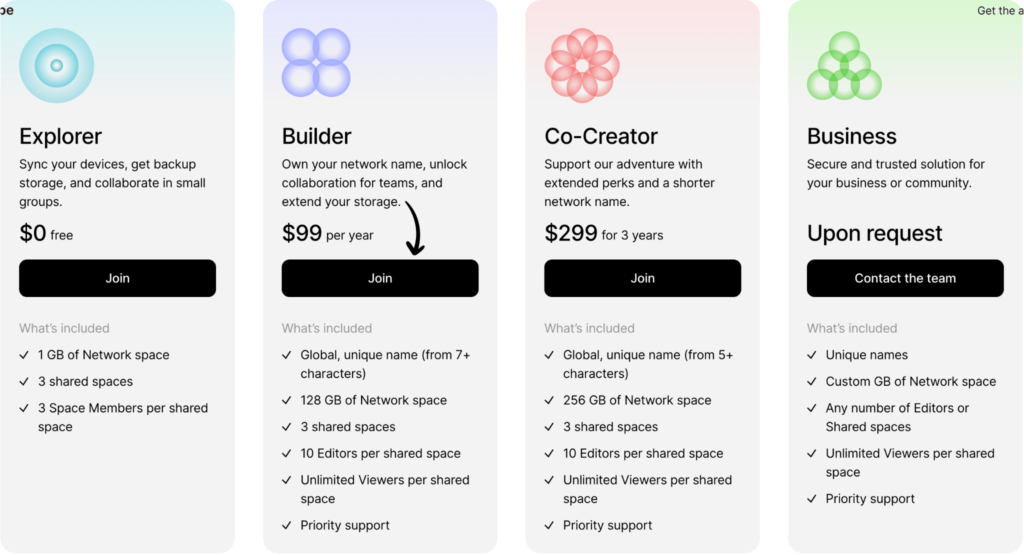
Anytype Pricing Model And Cost Efficiency
Anytype focuses on personal knowledge management with a different pricing approach.
- Free Plan: Access to core note-taking and database features.
- Pro Plan: Offers enhanced storage and premium features at a flat monthly rate.
Anytype’s model is simple and cost-effective for users who want local-first, interconnected notes without complex project features.
| Plan | Cost (per user/month) | Key Features |
|---|---|---|
| Free | $0 | Basic notes, local storage, offline access |
| Pro | $10 | Cloud sync, more storage, priority support |
Which Option Offers Better Roi Based On User Needs
ClickUp fits teams and users needing comprehensive project and task management. It offers strong value for collaborative work and scaling teams.
Anytype suits users focused on personal knowledge and note connections. It delivers cost efficiency for individuals who prioritize data privacy and simplicity.
- Choose ClickUp for team projects, automation, and integrations.
- Choose Anytype for personal notes, offline use, and local data control.
The return on investment depends on your workflow and features priority. ClickUp maximizes productivity for groups, while Anytype excels in personal knowledge management.
Pros And Cons Based On Real-world Usage
Understanding the strengths and limitations of ClickUp and Anytype helps users choose the right tool. Both offer unique features that suit different needs. Real-world experiences reveal how they perform in daily tasks and project management. This section breaks down their key advantages and challenges.
Strengths And Limitations Of Clickup
ClickUp is a powerful project management platform with integrated note-taking. It aims to replace multiple apps with one unified workspace.
| Strengths | Limitations |
|---|---|
|
|
Strengths And Limitations Of Anytype
Anytype focuses on personal knowledge management with an emphasis on interconnected notes. It offers a local-first approach.
| Strengths | Limitations |
|---|---|
|
|
User Experience Insights And Common Challenges
Users report ClickUp as feature-rich but sometimes complex to master. The interface offers many customization options, which can confuse beginners. Performance issues appear with very large teams or projects.
Anytype appeals to users valuing privacy and deep note connections. It works well for personal knowledge but lacks strong team collaboration tools. Offline access is a plus, but some users want more integrations.
- ClickUp requires time investment to unlock full potential.
- Anytype suits individual users, not large teams.
- Both platforms continue to improve based on user feedback.
- Choosing depends on whether task management or knowledge linking is priority.
Ideal Users And Use Case Recommendations
Choosing the right productivity tool depends on your work style and goals. ClickUp and Anytype serve different needs. ClickUp focuses on team collaboration and project management. Anytype emphasizes personal knowledge and creative workflows. Understanding who benefits most from each helps pick the best fit.
Who Should Choose Clickup: Teams And Project Managers
ClickUp suits teams that need to organize projects, tasks, and communication in one place. It works well for project managers handling multiple workflows. Features include task lists, timelines, time tracking, and integrations.
- Teams needing clear task assignment and progress tracking
- Project managers coordinating resources and deadlines
- Businesses requiring automation to reduce repetitive work
- Organizations wanting a centralized workspace for all project data
ClickUp’s structure supports complex projects with many moving parts. Its AI and software integration help teams stay productive.
Who Should Choose Anytype: Personal Knowledge Workers And Creatives
Anytype appeals to individuals managing personal knowledge and creative content. It focuses on interconnected notes and privacy with a local-first approach. This suits users who want flexible, private, and visual ways to organize ideas.
- Writers, researchers, and students building deep knowledge bases
- Creative professionals capturing ideas and linking concepts
- Users valuing privacy and offline access to data
- Individuals wanting a customizable personal workspace
Anytype’s design encourages exploration and connection of information without distractions from team management features.
Scenarios Where Each Tool Excels
| Use Case | ClickUp | Anytype |
|---|---|---|
| Project Coordination | Ideal for managing team tasks and deadlines with clear visibility. | Not designed for team-based project management. |
| Personal Knowledge Management | Basic note-taking tied to tasks. | Strong in creating rich, linked personal knowledge networks. |
| Creative Idea Development | Supports task-based creativity but limited in content linking. | Excels in flexible, visual content organization for creativity. |
| Privacy and Data Control | Cloud-based with standard security. | Local-first with greater control over data privacy. |
| Automation and Integrations | Rich automation and integration ecosystem. | Limited automation, focuses on personal workflow. |
Conclusion: Choosing Between Clickup And Anytype
Choosing between ClickUp and Anytype depends on your main productivity needs. Both tools serve different purposes and offer unique strengths. ClickUp focuses on project management with integrated note-taking and task tracking. Anytype centers on personal knowledge management with a strong emphasis on interconnected notes and local data storage. Understanding their differences helps in picking the right tool for your workflow.
Summary Of Key Takeaways
- ClickUp excels in managing projects, tasks, and team collaboration.
- Anytype focuses on personal knowledge with flexible, linked notes.
- ClickUp offers extensive integrations and automation for work efficiency.
- Anytype provides a local-first approach, keeping data private and offline.
- ClickUp suits teams and complex workflows with visual task tracking.
- Anytype is ideal for users wanting a personal, connected knowledge base.
Decision Factors Based On Productivity Goals
| Productivity Goal | Best Choice | Reason |
|---|---|---|
| Team Project Management | ClickUp | Task assignments, timelines, and collaboration features |
| Personal Knowledge Organization | Anytype | Interconnected notes with local data control |
| Automation and Integrations | ClickUp | Supports many apps and AI agents for workflows |
| Data Privacy and Offline Access | Anytype | Local-first storage with strong privacy focus |
Final Recommendations For Productivity Masters
- Choose ClickUp if you manage projects or collaborate with teams daily.
- Select Anytype for building a personal, secure knowledge base.
- Use ClickUp to replace multiple apps with one platform for work tasks.
- Pick Anytype to connect ideas and notes flexibly without internet reliance.
- Consider your workflow: structured task management favors ClickUp.
- Explorative note linking and privacy lean towards Anytype.
Both tools help maximize productivity but in distinct ways. Identify your priorities to decide wisely.
Credit: clickup.com
Frequently Asked Questions
What Is The Difference Between Anytype And Clickup?
Anytype focuses on personal knowledge management with interconnected notes. ClickUp centers on project management, combining tasks, notes, and team collaboration. Anytype offers a local-first, flexible data approach, while ClickUp excels in task tracking and workflow automation for teams.
Is There Anything Better Than Clickup?
Several tools can outperform ClickUp based on needs. Monday. com excels in visual workflows, Asana offers clean task management, Notion provides flexible documentation, and Jira suits development teams. Choose alternatives by features like simplicity, customization, or team size for better fit than ClickUp.
Is Clickup Good For Adhd?
ClickUp helps ADHD users with visual tools and customizable task breakdowns. Simple setups and ADHD-friendly templates improve focus and productivity.
Why Is Clickup So Popular?
ClickUp is popular for its all-in-one project management, customizable features, user-friendly interface, and strong collaboration tools. It boosts productivity and adapts to various team needs.
Conclusion
Choosing between ClickUp and Anytype depends on your needs. ClickUp excels at managing projects and tasks with notes. Anytype works well for personal knowledge and linked notes. ClickUp offers many tools in one platform. Anytype focuses on local, flexible information connections. For team projects, ClickUp often fits better. For personal note-taking, Anytype may suit you more. Explore ClickUp’s features to boost your productivity: ClickUp. This choice helps you organize work or ideas simply and clearly.
