
Are you struggling to choose between Smartsheet and ClickUp for managing your projects and boosting your team’s productivity? You’re not alone.
Both tools promise to help you organize tasks and streamline workflows, but which one truly fits your style and needs? Smartsheet offers a familiar, spreadsheet-like layout that’s great for structured and complex projects. However, it can feel overwhelming with its steep learning curve and limited mobile features. On the other hand, ClickUp shines with its flexible, visual interface packed with templates and multiple views, making it perfect if you crave creativity and customization in one place. If you want to replace all your software, AI agents, and human collaboration tools with a single solution designed to maximize your productivity, ClickUp might just be the game-changer you’re looking for. Ready to see how it stacks up against Smartsheet and why thousands are making the switch? Check out ClickUp here and discover a new way to work smarter: ClickUp. Keep reading to find out which tool suits your workflow best and how you can get the most out of your project management software.
Introduction To Smartsheet And Clickup
Choosing the right project management tool shapes your team’s productivity and success. Smartsheet and ClickUp stand out as popular options. Both offer unique features to help teams organize, track, and complete projects efficiently.
This section introduces the core purpose and use cases of each tool. It also explains why comparing them matters for project success.
Overview Of Smartsheet: Purpose And Core Use Cases
Smartsheet focuses on structured project management with a spreadsheet-style interface. It suits projects that require strict workflows and detailed task tracking.
- Ideal for complex, data-heavy projects
- Supports automation and workflow management
- Used in industries like construction, IT, and operations
- Helps teams manage timelines, budgets, and resources
Its layout resembles familiar spreadsheets, which eases adoption for users comfortable with Excel. Yet, advanced features have a steep learning curve and the interface can feel unintuitive for some.
Overview Of Clickup: Purpose And Core Use Cases
ClickUp offers a flexible, visual approach to project management. It combines multiple views and templates to support creativity and collaboration.
- Designed for teams needing flexibility and customization
- Supports task lists, boards, calendars, and Gantt charts
- Integrates apps, AI agents, and human collaboration in one place
- Popular among creative teams, startups, and marketing groups
ClickUp aims to replace many software tools, centralizing work to maximize productivity. Its interface is user-friendly and adaptable, with strong mobile support.
Why Comparing Smartsheet And Clickup Matters For Project Success
Selecting between Smartsheet and ClickUp impacts how smoothly your projects run. Each tool fits different work styles and project needs.
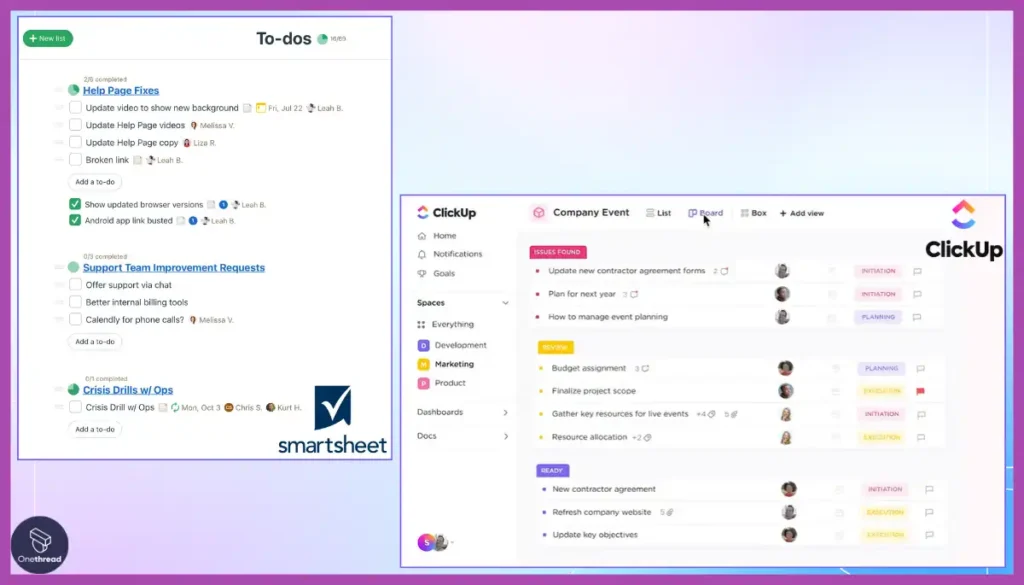
- Task Management Style: Smartsheet suits structured, rule-based workflows. ClickUp supports flexible, visual task handling.
- Team Collaboration: ClickUp enables easy communication and app integration. Smartsheet focuses on process control and data accuracy.
- Learning Curve and Usability: Smartsheet’s advanced features require training. ClickUp is simpler to start and customize.
- Cost and Scalability: Smartsheet may be costly for small teams. ClickUp offers scalable pricing and broad functionality.
Understanding these differences helps pick a tool that fits your project’s size, complexity, and team preferences. This choice can improve efficiency and boost project outcomes.
Credit: www.techrepublic.com
Key Features That Set Smartsheet Apart
Smartsheet stands out with its focus on structured project management. It combines the familiarity of spreadsheets with powerful automation and robust integrations. These features make it ideal for teams managing complex workflows and large data sets. Smartsheet offers tools that help maintain strict controls, ensuring projects stay on track and data stays organized.
Spreadsheet-style Management For Structured Projects
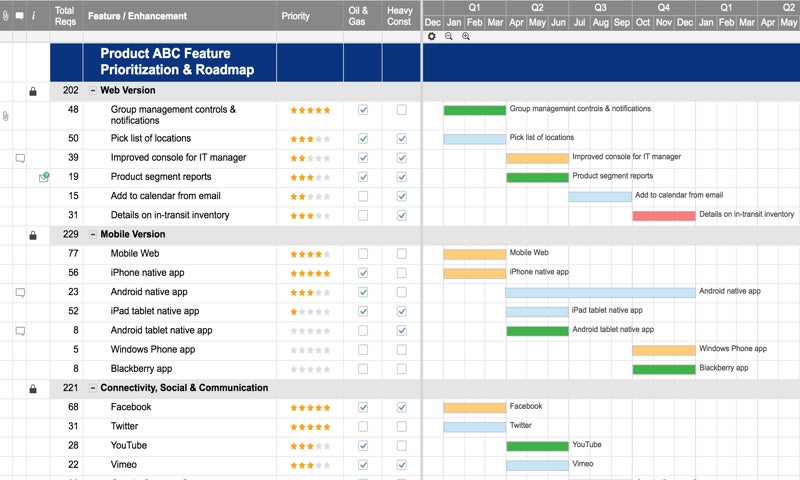
Smartsheet uses a spreadsheet-like interface that feels familiar to many users. It allows teams to organize tasks, timelines, and resources in a clear, tabular format. This style suits projects that require detailed data entry and tracking.
- Rows and columns for task details and deadlines
- Customizable views with grid, card, and Gantt charts
- Easy sorting and filtering of project data
This approach helps teams keep all project information in one place. It makes tracking progress and dependencies straightforward.
Advanced Workflow Automation And Strict Process Controls
Smartsheet offers automation features that reduce manual work and enforce process rules. Users can create automated alerts, reminders, and approval requests to keep tasks moving.
- Conditional workflows that trigger actions based on specific criteria
- Approval workflows to ensure compliance and quality checks
- Automated status updates to keep everyone informed
These controls help teams follow strict processes without missing steps. Automation saves time and cuts down on errors.
Integration Capabilities And Data Handling Strengths
Smartsheet connects with many popular business tools, enhancing its data handling power. It supports integrations with platforms like Microsoft Office 365, Google Workspace, Salesforce, and Slack.
| Integration | Use Case |
|---|---|
| Microsoft Office 365 | Sync files and calendars |
| Google Workspace | Collaborate on documents and emails |
| Salesforce | Manage sales pipelines and customer data |
| Slack | Receive real-time notifications |
Smartsheet handles large data sets with ease. It supports complex formulas and reporting, allowing detailed project analysis. This makes it suitable for data-driven teams needing reliable performance.
Unique Features Of Clickup And Their Benefits
ClickUp stands out with features designed to boost productivity and simplify project management. Its tools suit creative teams and adapt to various workflows. The platform blends flexibility with user-friendly design, helping teams manage tasks efficiently.
Visual And Flexible Interface With Multiple Project Views
ClickUp offers a visual, flexible interface that supports different project views. Users can switch between:
- List View: Simple task lists for clear organization.
- Board View: Kanban-style boards for tracking progress visually.
- Calendar View: Task deadlines and schedules displayed on a calendar.
- Gantt Chart: Timeline view for managing project deadlines and dependencies.
- Mind Map: Visualize ideas and project flow creatively.
This variety allows teams to choose views that fit their style and project needs. It keeps work organized and easy to follow.
Extensive Template Library Tailored For Creative Teams
ClickUp’s template library is rich and designed for creative workflows. It includes templates for:
- Content calendars
- Design projects
- Marketing campaigns
- Product launches
Templates save time by providing ready-made structures. Teams can customize them to fit their unique processes. This helps maintain consistency and speeds up project setup.
Comprehensive Mobile App With Rich Functionality
ClickUp’s mobile app offers nearly all desktop features. Users can:
- Create and edit tasks
- View multiple project layouts
- Communicate with team members
- Track time and progress
The app’s rich functionality ensures productivity even on the go. It supports notifications and offline access, helping teams stay connected anywhere.

Credit: www.smartsuite.com
Pricing And Affordability Breakdown
Understanding the pricing structures of Smartsheet and ClickUp helps pick the right tool. Cost matters for teams of all sizes. Both platforms offer tiered plans with different features. Affordability depends on team size, needs, and budget.
Smartsheet Pricing Tiers And Cost Implications For Small Vs. Large Teams
Smartsheet offers three main pricing tiers:
- Pro Plan: About $7 per user/month, best for individuals or small teams.
- Business Plan: Around $25 per user/month, suited for growing teams needing advanced features.
- Enterprise Plan: Custom pricing, designed for large organizations requiring extensive control and support.
Small teams may find the Pro Plan affordable but limited in features.
Large teams often need the Business or Enterprise plans, which increase costs but add powerful tools and integrations.
Clickup Pricing Plans And Value Proposition
ClickUp offers flexible pricing options:
| Plan | Cost per User/Month | Key Features |
|---|---|---|
| Free | $0 | Unlimited tasks, 100MB storage, basic features |
| Unlimited | $5 | Unlimited storage, integrations, dashboards |
| Business | $12 | Advanced automations, goals, portfolios |
| Enterprise | Custom pricing | Advanced security, custom permissions, onboarding |
ClickUp’s free plan suits small teams or individual users well.
Paid plans offer strong value with many features at lower price points than Smartsheet.
Comparative Analysis: Which Offers More Bang For Your Buck?
ClickUp generally costs less per user than Smartsheet, especially for small teams.
ClickUp’s free plan is a strong option for startups or freelancers.
Smartsheet suits large organizations needing strict workflows despite higher prices.
| Aspect | Smartsheet | ClickUp |
|---|---|---|
| Starting Price | $7/user/month | Free |
| Advanced Features | Available at higher tiers | Included at lower price points |
| Best for | Complex project management, large teams | Flexible use, small to large teams |
| Mobile App | Limited | Strong and user-friendly |
For tight budgets, ClickUp offers more features at lower costs. Teams needing complex, structured workflows may prefer Smartsheet despite higher fees.
Pros And Cons Based On Real-world Usage
Choosing between Smartsheet and ClickUp depends on user needs and project types. Both tools offer unique strengths and face some challenges. Real-world usage shows how these platforms perform in daily tasks and team collaboration. Below is a detailed look at their usability, performance, customer support, and reliability.
Smartsheet: Strengths And Challenges In Usability And Performance
Strengths:
- Ideal for structured, complex projects with strict workflows.
- Spreadsheet-style interface suits users familiar with Excel.
- Strong capabilities for resource management and tracking.
- Supports automation and reporting features effectively.
Challenges:
- Steep learning curve for advanced features.
- Some users find the interface unintuitive.
- Limited mobile app functionality reduces flexibility.
- High cost can be a barrier for small teams.
- Issues with complex formulas and customization options.
- Activity log and app performance can be unreliable at times.
Clickup: Strengths And Challenges In Usability And Performance
Strengths:
- Visual, flexible interface with multiple views and templates.
- Great for creative teams and dynamic workflows.
- Combines many tools in one platform, reducing app switching.
- Easy to customize and adapt to different project types.
- Strong mobile app with consistent updates.
Challenges:
- Can feel overwhelming due to many features.
- Some users report slower loading times on large projects.
- Customization options may require time to master.
- Occasional bugs and UI glitches reported.
User Feedback On Customer Support And Reliability
| Aspect | Smartsheet | ClickUp |
|---|---|---|
| Customer Support | Responsive but sometimes slow for complex issues. | Generally quick with live chat and extensive resources. |
| Reliability | Stable for large projects; occasional mobile app issues. | Reliable platform; minor bugs reported but frequent updates. |
| User Satisfaction | Favored by users needing strict project controls. | Preferred by teams seeking flexibility and visual tools. |
Ideal Users And Use Cases For Each Tool
Choosing the right project management tool depends on your team’s needs and project complexity. Smartsheet and ClickUp serve different audiences with unique strengths. Understanding who benefits most from each platform helps in making an informed decision.
When Smartsheet Is The Best Fit: Complex, Structured Projects
Smartsheet excels in managing projects that require a high level of structure and precision. It uses a spreadsheet-like interface, making it ideal for teams comfortable with traditional data layouts.
- Great for projects with strict workflows and deadlines.
- Supports complex formulas and detailed resource management.
- Favored by industries like construction, finance, and operations.
- Helps track dependencies and milestones clearly.
The platform suits users who need rigorous control and detailed reporting. Its advanced features can require time to learn but reward with strong process management.
When Clickup Excels: Creative Teams And Flexible Project Management
ClickUp offers a flexible and visual workspace that adapts to various workflows. It supports multiple views such as lists, boards, calendars, and timelines.
- Perfect for creative teams needing collaboration and adaptability.
- Provides numerous templates to speed up project setup.
- Integrates tasks, docs, goals, and chats in one platform.
- Works well for marketing, design, and software development projects.
ClickUp’s user-friendly interface helps teams stay agile and communicate easily. It fits teams that value flexibility over rigid structure.
Choosing The Right Tool Based On Team Size, Project Type, And Workflow Needs
| Criteria | Smartsheet | ClickUp |
|---|---|---|
| Team Size | Medium to large teams needing detailed control | Small to large teams valuing flexibility and collaboration |
| Project Type | Structured, data-heavy projects with strict timelines | Creative, dynamic projects with varied workflows |
| Workflow Needs | Formal workflows, complex dependencies, and resource tracking | Flexible workflows, multiple views, and easy communication |
| Learning Curve | Steeper; requires training for advanced features | Gentle; intuitive interface with templates |
| Mobile Experience | Limited native mobile features | Robust mobile app for on-the-go management |
Evaluating these aspects guides selection. Structured projects with heavy data benefit from Smartsheet. Projects needing creativity and team flexibility thrive with ClickUp.
Final Verdict: Which Tool Delivers Project Success?
Choosing the right project management tool shapes your team’s success. Both Smartsheet and ClickUp have unique strengths. Smartsheet suits structured, complex projects with spreadsheet-style workflows. ClickUp provides a flexible, visual interface with many views and templates. Understanding their differences helps pick the best fit for your project goals.
Summary Of Key Differences And Their Impact On Project Outcomes
| Feature | Smartsheet | ClickUp |
|---|---|---|
| Interface Style | Spreadsheet-like, structured | Visual, flexible, multiple views |
| Best For | Complex projects with strict workflows | Creative teams and varied project types |
| Learning Curve | Steep for advanced features | More intuitive, easier for beginners |
| Mobile Functionality | Limited native app features | Robust mobile experience |
| Customization | Limited customization options | Highly customizable with templates |
| Cost | Higher for small teams | More affordable and scalable |
Impact: Smartsheet excels in structured environments needing strict control. ClickUp supports diverse workflows and adapts well to creative, dynamic teams. The chosen tool influences team productivity and project clarity.
Recommendations Based On Specific Business Needs And Priorities
- Use Smartsheet if your projects demand strict, spreadsheet-style control.
- Choose ClickUp for flexible workflows and creative, fast-changing projects.
- Small teams benefit more from ClickUp’s cost and ease of use.
- Large enterprises with complex processes may prefer Smartsheet’s structure.
- Mobile-first teams find ClickUp’s app more reliable and user-friendly.
Tips For Maximizing Success With Your Chosen Platform
- Train your team on key features to reduce the learning curve.
- Customize workflows to fit your project style and team needs.
- Use templates for faster project setup and consistency.
- Leverage integrations with other tools to streamline work.
- Regularly review project progress using built-in dashboards.
- Encourage team feedback to improve tool usage and processes.
Credit: www.onethreadapp.com
Frequently Asked Questions
Is Smartsheet Better Than Clickup?
Smartsheet suits complex, structured projects with spreadsheet-style workflows. ClickUp offers a flexible, visual interface ideal for creative teams. Choose based on your project’s complexity and team needs.
What Are The Disadvantages Of Smartsheet?
Smartsheet has a steep learning curve and an unintuitive interface. It offers limited mobile functionality and lacks multiple tabs. High costs may burden small teams. Users report formula challenges, limited customization, slow performance, and occasional unreliable activity logs. Customer support and integrations can also be inconsistent.
What’s Better Than Clickup?
Smartsheet suits complex, structured projects with spreadsheet management. ClickUp excels in flexibility and visuals, ideal for creative teams. Choose based on your project needs and team style.
Does Smartsheet Integrate With Clickup?
Smartsheet does not offer a direct integration with ClickUp. Users connect them via third-party tools like Zapier or Integromat for data syncing.
Conclusion
Choosing between Smartsheet and ClickUp depends on your project needs. Smartsheet suits structured, complex projects with spreadsheet-like management. ClickUp offers flexibility with visual layouts and many templates. Its user-friendly design works well for creative teams and small businesses. Smartsheet can be harder to learn and may feel outdated. ClickUp combines many tools in one place to simplify work. Explore ClickUp to boost productivity and manage tasks efficiently. Learn more about ClickUp here.
