
Trying to boost your productivity but stuck between Todoist and GQueues? You’re not alone.
Both apps promise to make your task management smoother, but which one truly fits your style and needs? Whether you’re managing personal errands or collaborating with a team, choosing the right tool can save you hours and reduce stress. You’ll discover the key differences between Todoist and GQueues, so you can pick the perfect system to organize your life with clarity and ease. Ready to find out which one helps you work smarter? Let’s dive in! If you want to get started with a powerful and user-friendly to-do list app right away, check out Todoist here.

Credit: www.gqueues.com
Introduction To Todoist And Gqueues
Task management tools help organize daily work and personal tasks. Todoist and GQueues are popular apps designed for this purpose. Each offers unique features to fit different needs. Understanding their core purpose and audience is key to choosing the right one.
Overview Of Todoist: Purpose And Target Audience
Todoist is a simple, powerful to-do list app. It aims to bring clarity to busy lives and work schedules. Over 50 million users rely on Todoist for its clean interface and task organization.
- Focuses on individuals and small teams
- Helps manage personal and professional tasks
- Offers project-based task lists with sharing options
- Supports keyword search and advanced query language
Its design suits users who want straightforward task tracking and easy collaboration on shared projects.
Overview Of Gqueues: Purpose And Target Audience
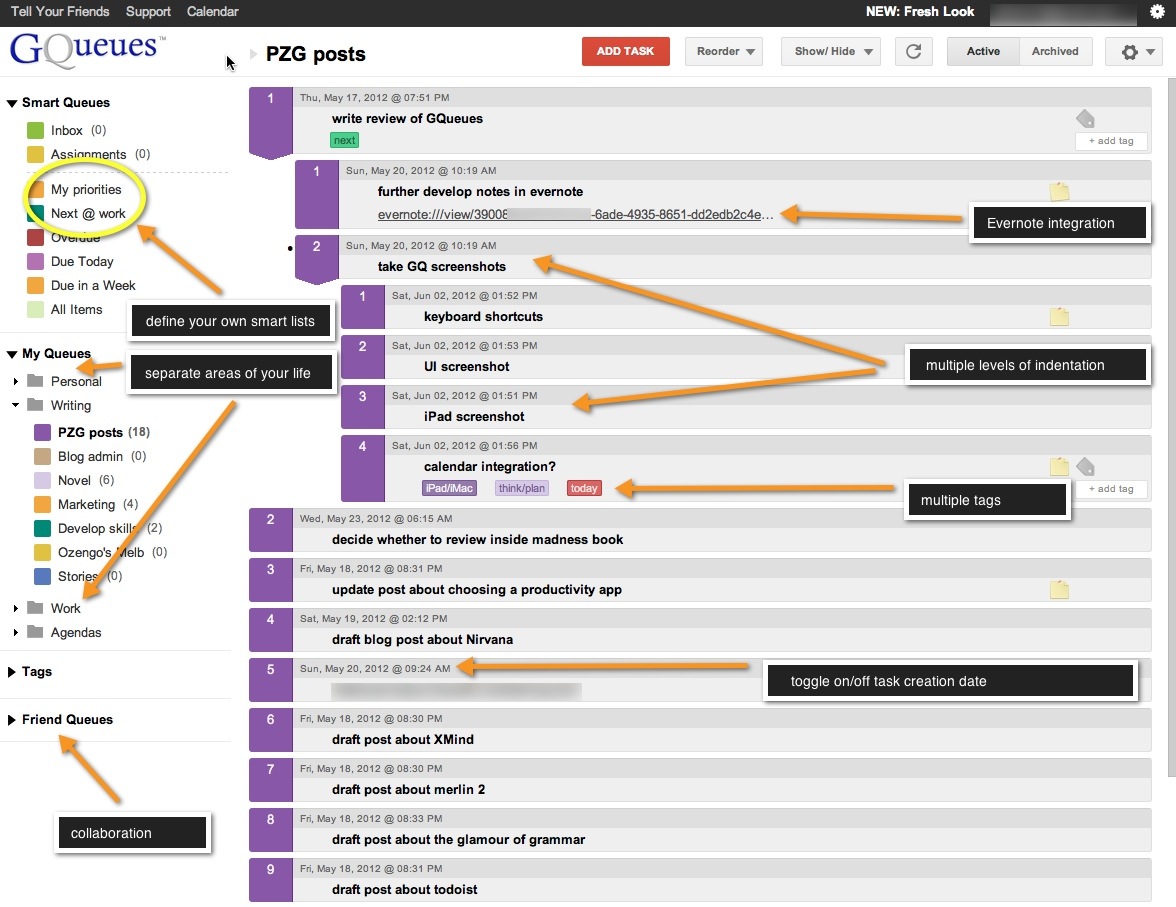
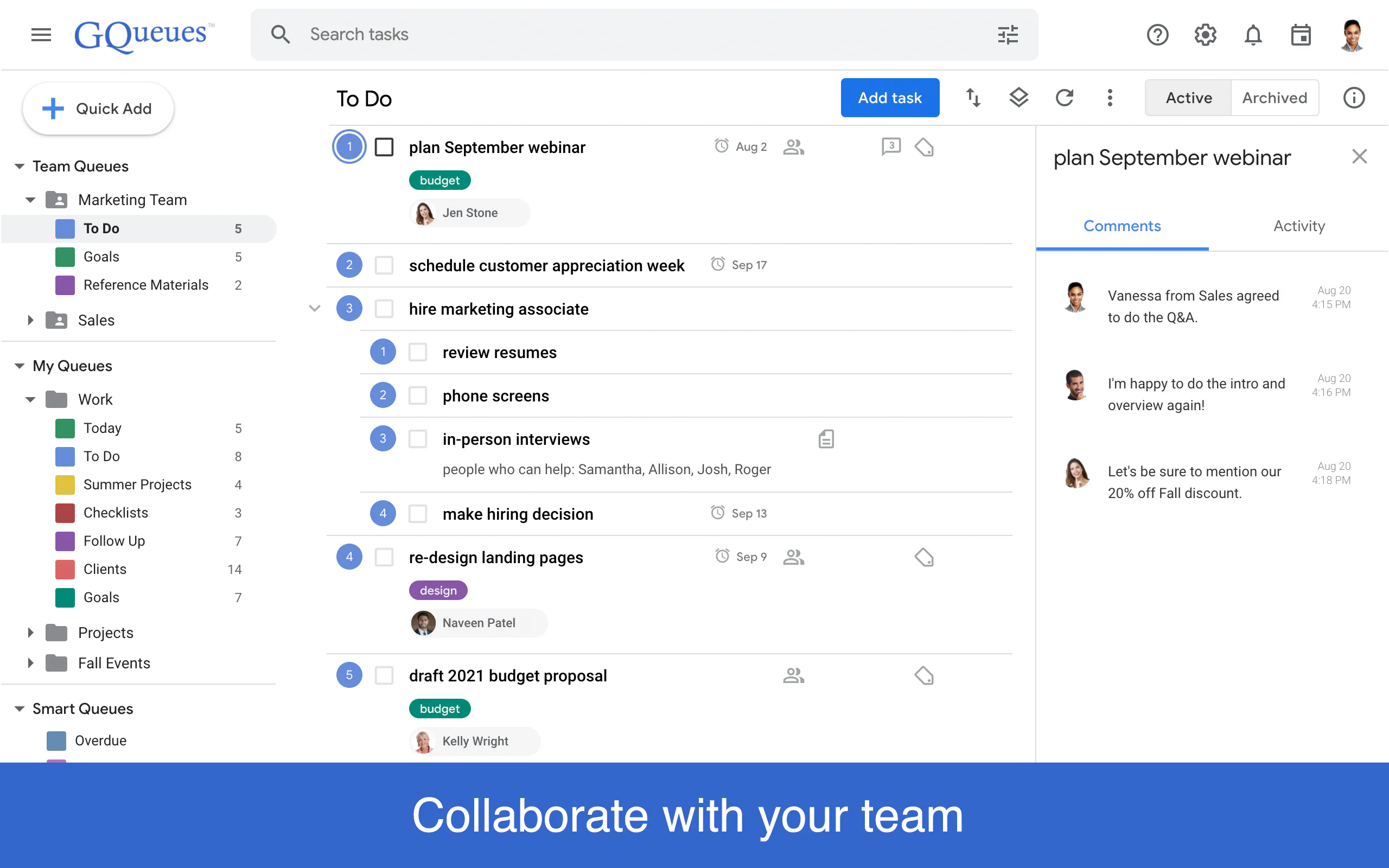
GQueues targets users needing stronger team task coordination. It supports assigning tasks to multiple people at once, making teamwork smoother.
- Built for teams and group projects
- Allows sharing and managing all lists related to a project simultaneously
- Enables flexible task assignment to any team member
- Focuses on improving team productivity and task visibility
GQueues fits teams that require detailed task delegation and project-wide sharing control.
Why Compare Todoist And Gqueues?
Both apps manage tasks but serve different user groups and needs. Comparing them helps find the best fit for task style and team size.
| Feature | Todoist | GQueues |
|---|---|---|
| Task Assignment | Assign only to users with shared lists | Assign to anyone, including multiple users |
| Sharing | Share one project at a time | Share all project lists at once |
| Audience | Individuals, small teams | Teams, group projects |
| Search | Keyword and advanced query language | Standard search features |
Choosing between Todoist and GQueues depends on task sharing needs and team collaboration style.
Credit: purplezengoat.com
Key Features Of Todoist
Todoist offers a clear, simple way to manage tasks and projects. It helps millions of users stay organized and work better. Its key features focus on easy collaboration, strong search tools, and a clean interface. These make task management smooth for individuals and teams.
Task Assignment And Sharing: Managing Collaborations With Shared Lists
Todoist allows users to assign tasks only to people who share the list. This means your team members must have access to the same shared list to get assigned tasks. It keeps collaborations focused but limits assigning tasks outside shared groups.
- Assign tasks within shared lists
- Keep track of who is responsible
- Encourages clear communication among collaborators
Advanced Search Capabilities: Using Keywords And Query Language
Todoist includes a powerful search feature using keywords and a special query language. This lets users find specific tasks quickly.
Examples of search capabilities:
- Search by task name or keyword
- Use filters like date, priority, or project
- Combine multiple search terms for precise results
This helps users stay organized and find work efficiently.
Project Sharing Limitations: One Project At A Time
Todoist restricts sharing to one project at a time. You cannot share multiple projects or entire workspaces simultaneously.
| Feature | Todoist | GQueues (for comparison) |
|---|---|---|
| Project Sharing | One project at a time | All related lists at once |
| Sharing Flexibility | Limited by project | More flexible sharing options |
This limitation can slow down teamwork if many projects require sharing.
User Interface And Ease Of Setup: Simplifying Task Management
Todoist has a clean and simple interface. It is easy to start using without a long setup.
- Minimal design reduces distractions
- Quick task entry with keyboard shortcuts
- Clear project and task views
- Easy to learn for new users
This simplicity makes task management faster and less stressful.
Key Features Of Gqueues
GQueues offers a robust set of features designed to enhance team productivity and simplify task management. Its capabilities focus on flexible task assignment, efficient list sharing, seamless integration with Google Workspace, and strong security measures. These features help teams stay organized and collaborate effectively.
Flexible Task Assignment: Assigning Tasks To Multiple Users Simultaneously
GQueues allows users to assign tasks to multiple team members at once. This feature helps distribute work quickly without repeating steps. Unlike some apps that limit task assignment to shared lists only, GQueues lets you assign tasks to anyone.
- Assign one task to several users simultaneously
- Improve team coordination and responsibility sharing
- Works even if the list is not shared with all users
Comprehensive List Sharing: Sharing All Lists Related To A Project At Once
Sharing project information is easier with GQueues. You can share all lists related to a project in one step. This saves time and keeps everyone updated without sending multiple invitations.
| Feature | GQueues | Todoist |
|---|---|---|
| List Sharing | Share all project lists at once | Share one project list at a time |
| Sharing Permissions | Manage detailed permissions across lists | Limited sharing control |
Integration With Google Workspace: Streamlining Team Collaboration
GQueues integrates tightly with Google Workspace apps like Gmail, Google Calendar, and Drive. This streamlines team collaboration by syncing tasks and schedules effortlessly.
- Attach Google Drive files directly to tasks
- Sync due dates with Google Calendar
- Create tasks from Gmail messages
Security Measures: Ensuring Safe Task Management
Security is a priority for GQueues. It uses strong protocols to protect your data and maintain privacy. You get secure task management with features like:
- Encrypted data transmission
- Regular security updates
- Access control for shared lists
This helps teams work confidently without worrying about data leaks or unauthorized access.
Pricing And Affordability Breakdown
Choosing the right task management tool depends heavily on pricing and value. Both Todoist and GQueues offer different pricing models aimed at individuals and teams. Understanding their pricing tiers and cost-effectiveness helps decide which platform fits your budget best.
Todoist Pricing Tiers And Value For Money
Todoist offers a simple pricing structure with three main plans:
| Plan | Price | Key Features |
|---|---|---|
| Free | $0 | Basic task management, up to 80 active projects |
| Pro | $4/month (billed annually) | Reminders, comments, labels, filters, 300 active projects |
| Business | $6/user/month (billed annually) | Team inbox, admin controls, priority support |
Todoist delivers strong value for money with advanced features even in the Pro tier. The Free plan suits light users, while Business targets teams needing collaboration tools.
Gqueues Pricing Plans And Cost-effectiveness
GQueues has a straightforward pricing plan:
| Plan | Price | Key Features |
|---|---|---|
| Free | $0 | Basic task lists, limited sharing |
| Premium | $25/year (approx. $2.08/month) | Task assigning, multiple user assignments, full sharing |
The Premium plan is affordable and focuses on team collaboration, allowing multiple assignments per task. This makes GQueues cost-effective for users prioritizing shared task management.
Comparative Analysis: Which Offers Better Roi?
- Todoist excels with a versatile Free plan and scalable paid tiers.
- GQueues offers a very low-cost Premium plan focusing on team task assignment.
- Todoist’s Business plan is pricier but includes advanced team features.
- GQueues charges a flat annual fee that suits small teams or individuals.
- For solo users, Todoist Free or Pro offers more features.
- For teams, GQueues Premium provides better collaborative task control at a lower price.
Choosing depends on your team size and feature needs. Todoist offers greater flexibility. GQueues provides focused collaboration at a lower cost.
Pros And Cons Based On Real-world Usage
Understanding the strengths and weaknesses of Todoist and GQueues helps users pick the right tool. Real-world user feedback reveals practical insights. This section breaks down what users appreciate and what challenges they face.
Todoist: Strengths And Limitations From User Feedback
Todoist wins praise for its clean design and simple task management. Users love how easy it is to create tasks quickly and organize projects.
- Strengths:
- Intuitive interface suitable for beginners
- Powerful search with keyword and query language
- Supports sharing one project at a time
- Effective for personal and small team use
- Limitations:
- Sharing is limited to one project at a time
- Task assignment only to users with shared lists
- Less flexible for managing larger teams
Users note Todoist’s simplicity may not meet complex team needs.
Gqueues: Advantages And Challenges Reported By Users
GQueues is favored for team collaboration features. It allows task assignments to multiple users and broader sharing options.
- Advantages:
- Assign tasks to anyone, including multiple users at once
- Share all lists related to a project simultaneously
- Better suited for larger teams and complex projects
- Strong security measures to protect data
- Challenges:
- Interface can feel less intuitive for new users
- Requires more setup time for team administration
- Some users find it less visually appealing
GQueues users value flexibility but mention a learning curve.
Usability And Administration: Comparing User Experiences
| Feature | Todoist | GQueues |
|---|---|---|
| User Interface | Simple, clean, user-friendly | Functional but less intuitive |
| Task Assignment | Only to users with shared lists | Assign to multiple users freely |
| Project Sharing | One project at a time | All related lists at once |
| Team Management | Best for small teams | Designed for larger teams |
| Setup & Administration | Minimal setup needed | More setup and admin control required |
Todoist suits users wanting quick setup and ease of use. GQueues fits teams needing robust task delegation and sharing.
Credit: www.getapp.com.au
Ideal Users And Use Case Recommendations
Choosing the right task manager depends on your team size, workflow, and platform preferences. Both Todoist and GQueues have distinct strengths. Understanding who benefits most from each tool helps maximize productivity and clarity.
Best Scenarios For Choosing Todoist: Individual And Small Teams
Todoist suits individuals and small teams needing a simple, clean interface for personal and shared tasks. It offers:
- Easy project sharing, but limited to one project at a time
- Powerful keyword search and query language
- Intuitive to-do list with priority levels and labels
- Good for managing daily tasks and light collaboration
This tool fits users who want straightforward task tracking without complex team management features.
When Gqueues Is The Optimal Choice: Larger Teams And Google Workspace Users
GQueues excels for larger teams and those deeply integrated with Google Workspace. Key features include:
- Assign tasks to multiple users simultaneously
- Share all related lists within a project in one go
- Seamless integration with Google Calendar and Gmail
- Advanced permission controls for better team management
This platform supports complex team workflows and collaborative task tracking across departments.
Task Management Styles And Preferences: Matching Features To Needs
| Feature | Todoist | GQueues |
|---|---|---|
| Task Assignment | Assign only within shared projects | Assign to anyone, including multiple users |
| Project Sharing | One project at a time | All lists related to a project at once |
| Search Function | Keyword and query language | Basic search with filters |
| Integration | Multiple platforms, limited Google tools | Deep Google Workspace integration |
Task style matters:
- For personal task clarity and simple team sharing, Todoist fits best.
- For collaborative, large-scale projects with Google tools, GQueues works better.
Match your task style and team size with the app that supports your workflow.
Conclusion: Making The Right Choice Between Todoist And Gqueues
Choosing between Todoist and GQueues depends on your task management needs. Both tools help boost productivity but offer different features and approaches. Understanding their key differences and unique benefits guides a smart decision for personal or team use.
Summary Of Key Differences And Unique Benefits
| Feature | Todoist | GQueues |
|---|---|---|
| Task Assignment | Assign tasks only to users with shared lists | Assign tasks to anyone, including multiple users simultaneously |
| Project Sharing | Share one project at a time | Share all lists related to a project at once |
| Search Capability | Advanced searches using keywords and query language | Standard search functions |
| Team Collaboration | Limited sharing and assignment options | Designed for better team collaboration with flexible permissions |
| Popularity | Used by over 50 million professionals worldwide | Trusted by users valuing security and team focus |
Final Thoughts On Enhancing Productivity With Either Tool
Todoist suits individuals or small teams needing a simple, clear task list. Its advanced search helps find tasks fast. It keeps work organized with minimal complexity.
GQueues excels for teams requiring flexible task assignments and broader project sharing. It supports collaboration well, letting multiple users share and manage tasks easily. Security is a strong focus.
Both tools improve productivity by reducing task chaos. Choose based on your team size, sharing needs, and search preferences.
Next Steps: Trying Out Todoist And Gqueues
- Visit Todoist’s website to explore features and sign up for a free trial.
- Check GQueues for its collaboration options and test sharing tasks with your team.
- Compare how each tool fits your daily workflow and team communication style.
- Start with one tool, then switch or combine if needed to find your best fit.
Testing both tools hands-on is the best way to find what works for you. Simple setups, clear interfaces, and task control matter most.
Frequently Asked Questions
What Is The Difference Between Gqueues And Todoist?
GQueues allows task assignment to multiple users and shares all project lists, enhancing team collaboration. Todoist limits sharing to one project and assigns tasks only within shared lists. GQueues suits teams needing advanced sharing; Todoist offers simpler, user-friendly task management.
What Is The 1/3/5 Rule In Todoist?
The 1/3/5 rule in Todoist limits daily tasks to 1 big, 3 medium, and 5 small tasks. This boosts focus and productivity.
Is Gqueues Safe?
GQueues uses strong encryption and secure servers to protect your data. It follows strict privacy policies to ensure user safety. Regular updates enhance security and reliability. Users control sharing and permissions for added protection. GQueues is a safe and trusted task management tool.
What Is The Alternative To Gqueues?
Popular alternatives to GQueues include Todoist, Trello, Asana, ClickUp, Microsoft Planner, and monday. com. These tools offer robust task management and team collaboration features.
Conclusion
Choosing between Todoist and GQueues depends on your task needs. Todoist offers simple project sharing and strong keyword search tools. GQueues lets you assign tasks to multiple users and share all lists in a project at once. Both help teams stay organized but differ in sharing and assignment options. For clear, easy task management, Todoist suits many users well. Explore Todoist’s features and see if it fits your style by visiting Todoist. Find the tool that keeps your work and life on track.
